

Practical guide
Desenzano del Garda Tourist Tax: 2026-2027 Guide

If you manage a holiday home, a tourist rental, or another type of accommodation facility in Desenzano del Garda, one of the administrative requirements you need to manage is the Desenzano del Garda tourist tax (imposta di soggiorno).
The Municipality of Desenzano provides an online portal through which property managers can register their accommodation and manage all the requirements related to the tourist tax: from reporting guest stays to submitting the monthly declaration and paying the amounts collected.

In this Gardastays guide, we will show you step by step how to use the Desenzano del Garda tourist tax portal, with screenshots of the different sections and practical instructions.
We will explain how to register your accommodation, request your login credentials, access the portal, create a delegate, register receipts, submit the monthly declaration, and make the required payment.
Step 1
How to Register Your Accommodation
Before you can use the Municipality of Desenzano del Garda’s tourist tax portal, you must first have correctly started your accommodation activity.
For a tourist rental or a Holiday Home and Apartment (CAV), the procedure requires submitting the notification required by regional regulations to the competent SUAP (One-Stop Shop for Productive Activities) through the Impresainungiorno portal. Depending on the type of activity, the procedure may require a CIA or SCIA.
Once the procedure has been completed, the accommodation details are transmitted to the relevant authorities and the CIR – Regional Identification Code is issued. The CIR is associated with the accommodation within the regional ROSS1000 system.
At this point, you can proceed with managing the tourist tax through the Municipality of Desenzano del Garda’s portal.
Official Information
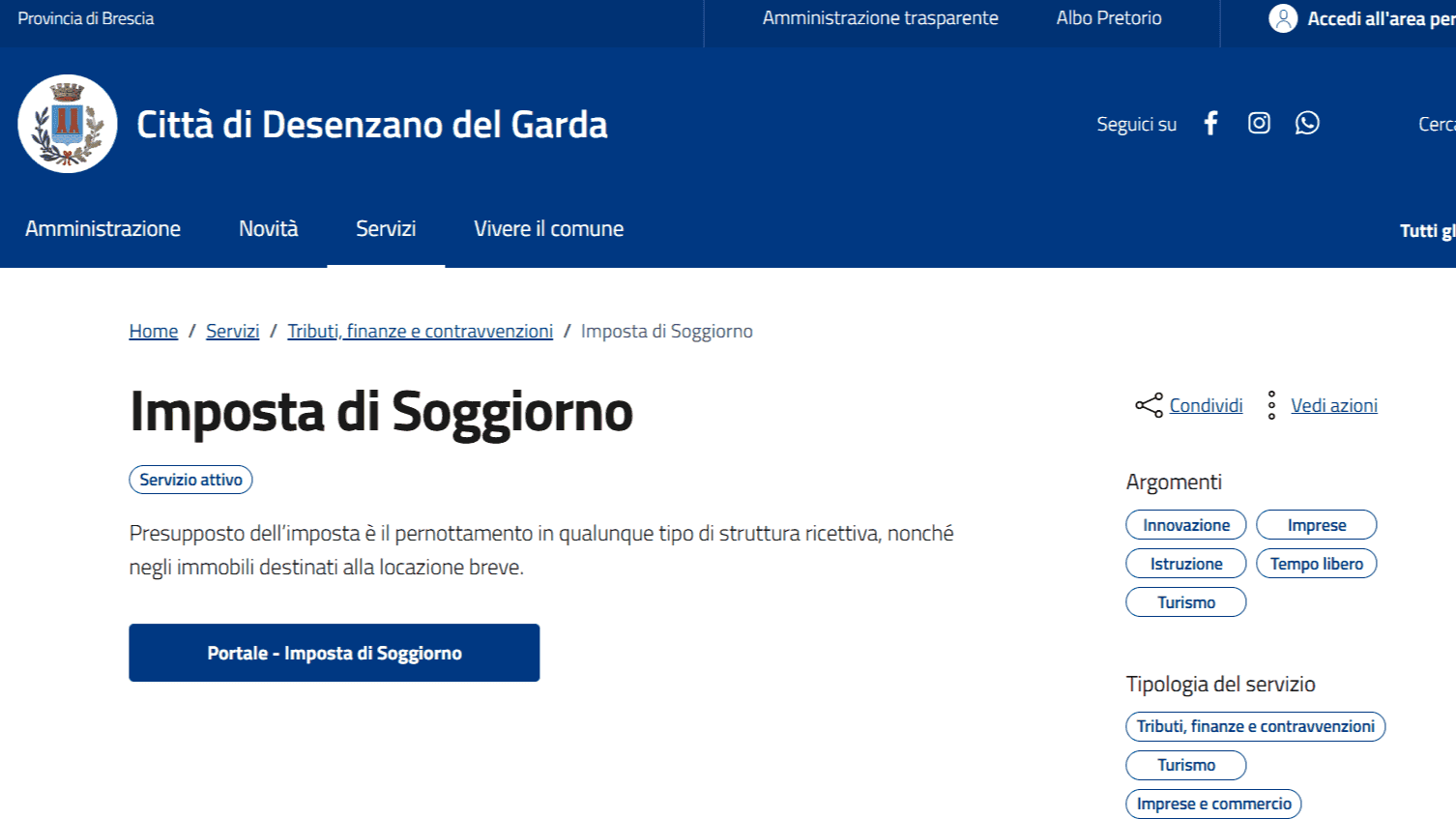
All information regarding the tourist tax, management procedures, and online services is available on the official website of the Municipality of Desenzano del Garda at this link.
Step 2
How to Request Your Tourist Tax Login Credentials
After completing the activity registration described in step 1, you can proceed with the activation of your access to the Municipality of Desenzano del Garda’s tourist tax portal.
The Municipality specifies that accommodation managers and those who collect the rent or consideration for short-term rentals must request the credentials required to register their accommodation in the Tourist Tax portal.
If You Have SPID or CIE
To access the Municipality’s online service, you can use the authentication methods provided by the portal, including SPID and CIE.
If you are a foreign property owner or do not have an Italian SPID/CIE, we recommend contacting the Municipality of Desenzano del Garda’s Tourist Tax Office directly to verify the procedure to follow.
For your request, you can attach the documentation relating to the start of your activity, such as the CIA or SCIA submitted through SUAP, depending on the type of accommodation, together with the application summary.
Contacting the Tourist Tax Office
The Municipality of Desenzano identifies the Tourist Tax Office within the Tax Office (Ufficio Tributi) as the department responsible for tourist tax matters.
E-mail: [email protected]
Phone: 030 9994152
If you need to contact the Municipality regarding your login credentials, we recommend including the following information in your email:
- first and last name of the property owner or manager;
- property address;
- tax identification number, if available;
- type of activity;
- CIR, if available;
- copy of the application submitted through SUAP;
- application summary;
- a brief request to be granted access to the tourist tax portal.
Where to Find the Municipality’s Updated Contact Details
To check for any changes to contact details or office opening hours, always refer to the Municipality’s official page dedicated to its offices and contacts.
Municipality of Desenzano del Garda – Office Contacts and Phone Numbers
Step 3
How to Access the Desenzano Tourist Tax Portal
Once you have obtained your login credentials or activated access through SPID, you can manage the Desenzano del Garda tourist tax through the StayTour portal.
You can access the portal directly here:
Desenzano del Garda Tourist Tax Portal
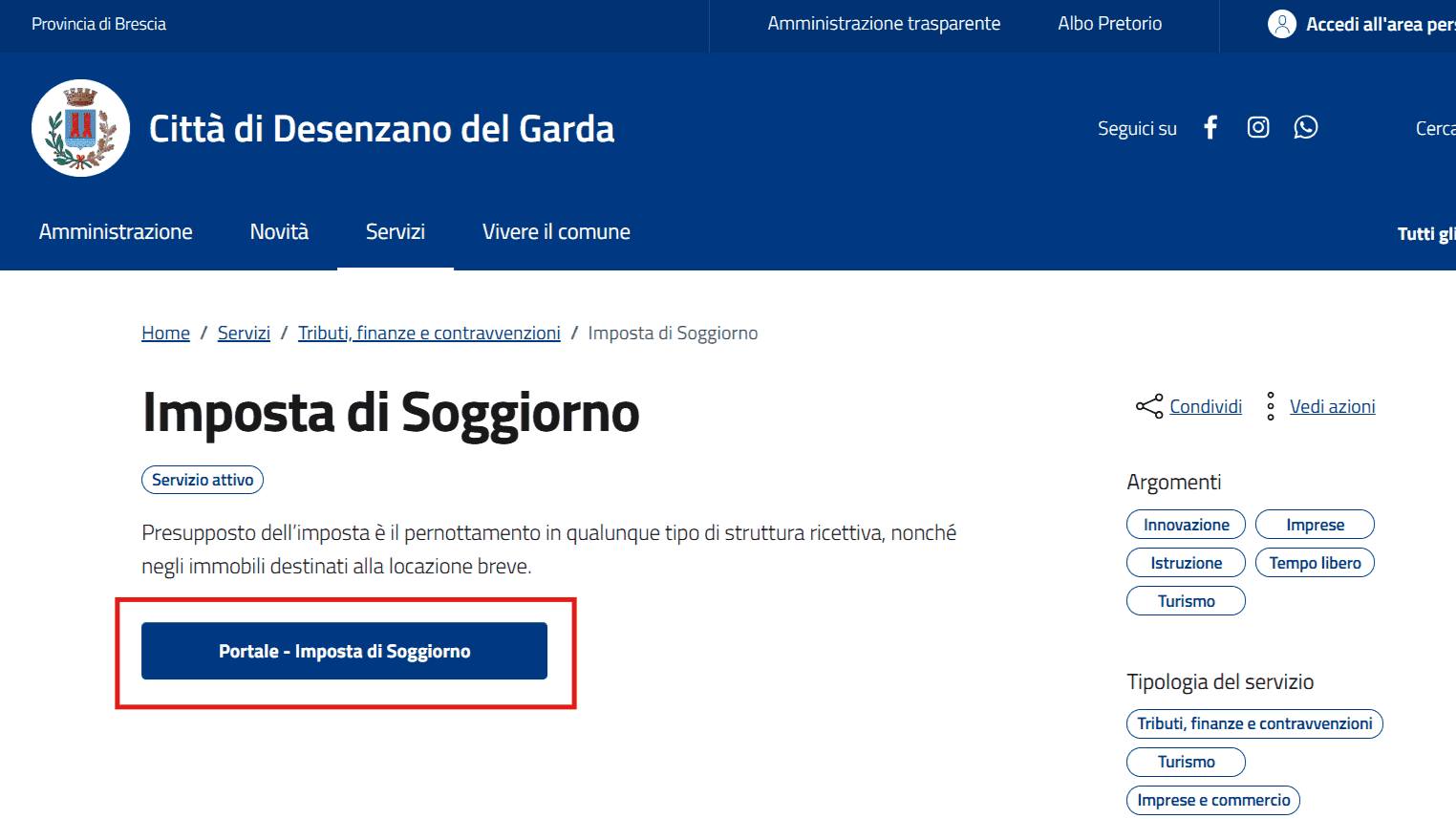
Alternatively, you can access it through the official website of the Municipality of Desenzano del Garda by clicking the “Tourist Tax Portal” button on the page dedicated to the service:
Tourist Tax – Municipality of Desenzano del Garda
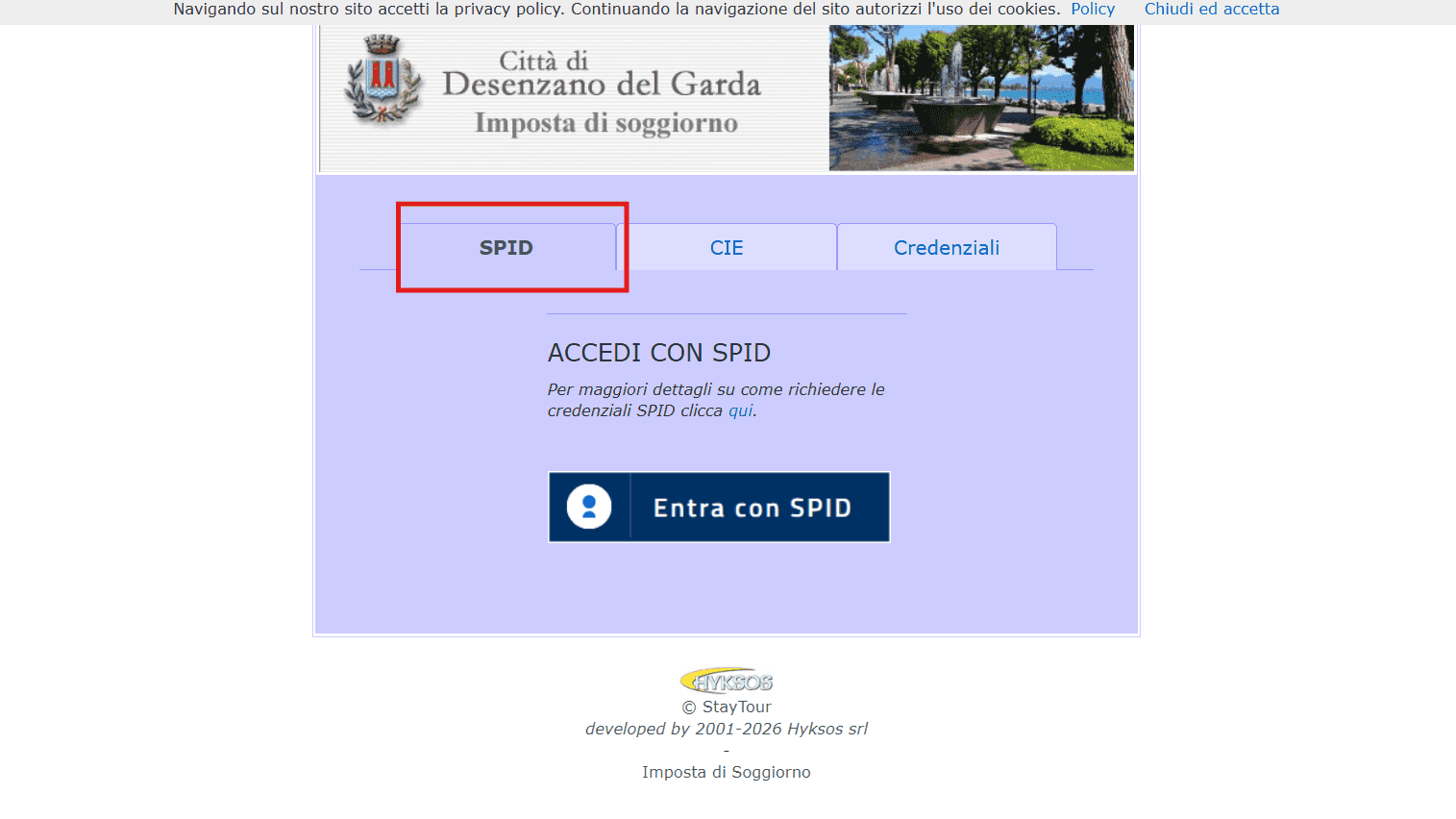
This is the initial screen of the tourist tax portal, managed through the StayTour platform.
To proceed, click the access button and you will be redirected to the authentication screen.
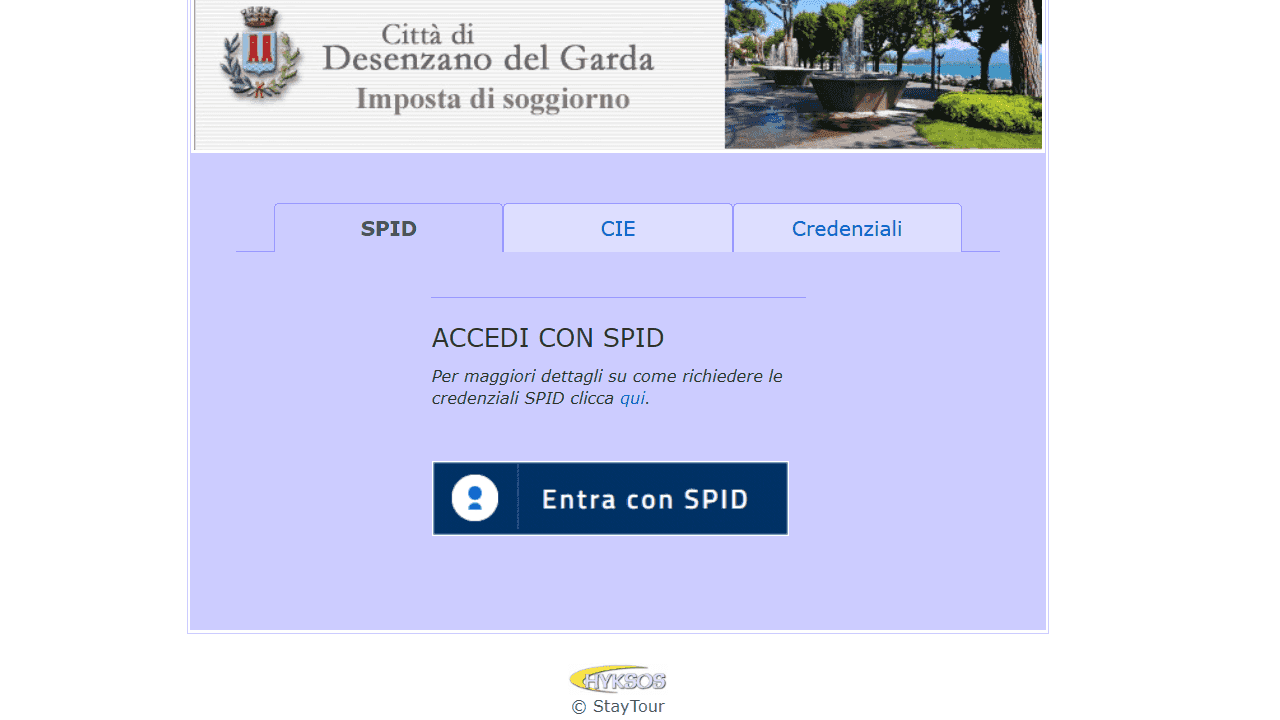
On the access screen, you can choose from the available authentication methods: SPID, CIE (Electronic Identity Card), or login credentials, when applicable.
If you are accessing the accommodation for the first time, make sure to use the SPID associated with the person indicated in the application submitted to start the activity. At this stage, any delegated users have not yet been configured.
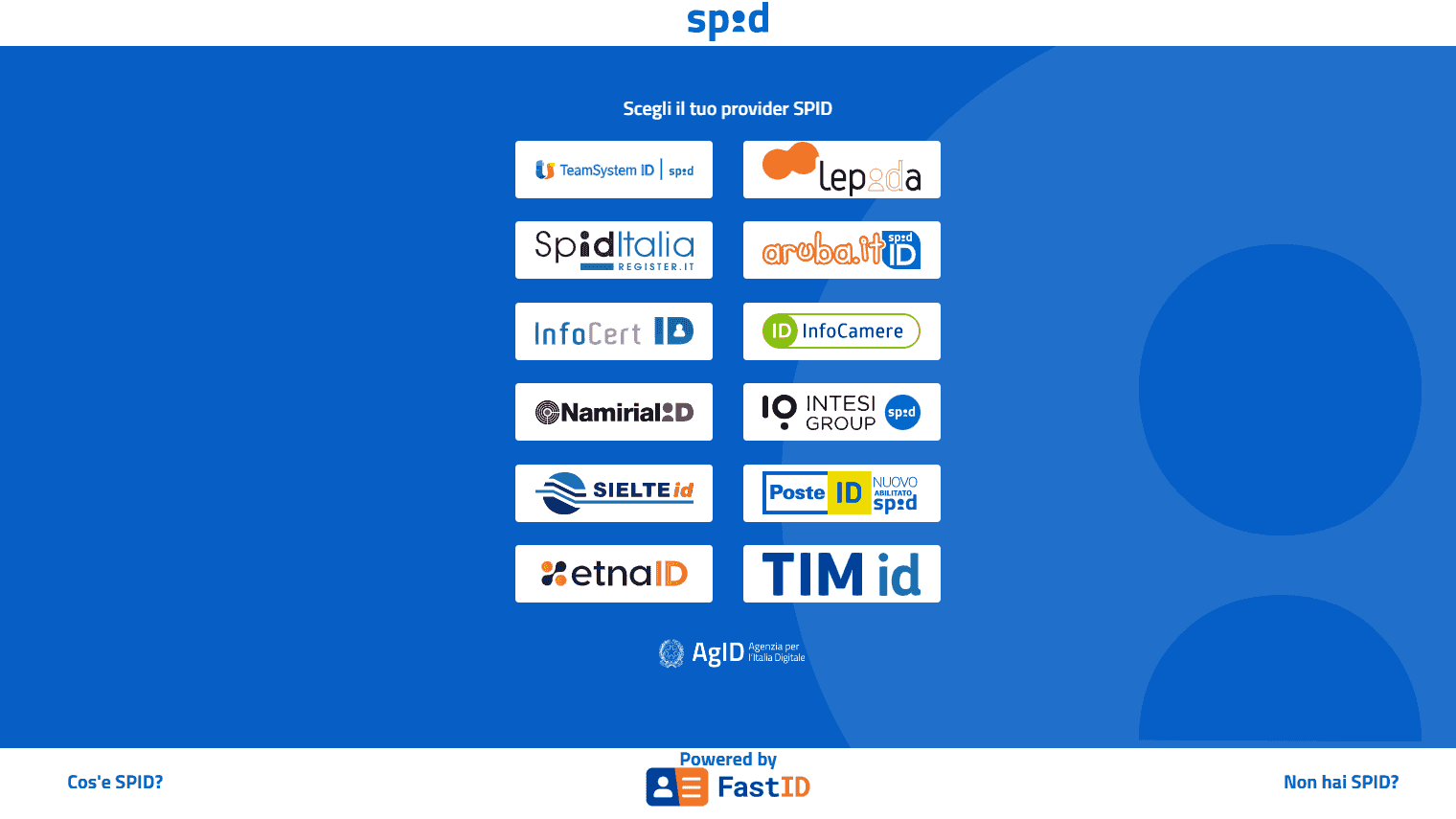
If you choose to access the portal via SPID, select the provider you use for your SPID from the available list and proceed with authentication.
Then follow the procedure required by your provider to complete access to the portal.
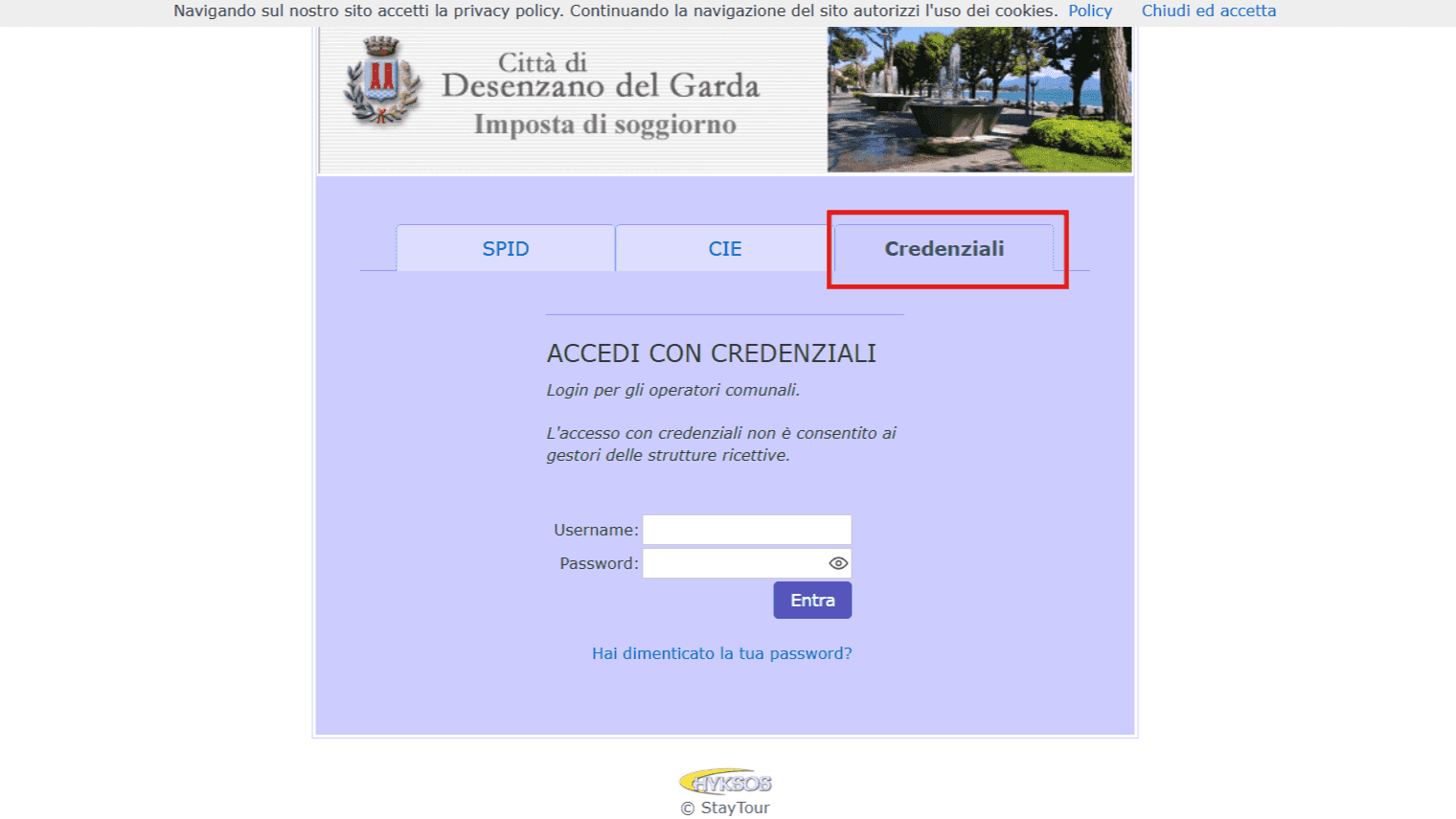
If you are a foreign property owner and do not have SPID or CIE, as explained in the previous section, you must first contact the Municipality of Desenzano del Garda to request login credentials.
Once you have received them, select the “Credentials” option on the access screen and enter the username and password provided by the Municipality.
Step 4
StayTour Portal Interface (Desenzano)
Once you have successfully logged in, you should see a list of the accommodations associated with your tax identification number or the credentials used to access the portal.
Select the accommodation for which you want to manage the tourist tax.
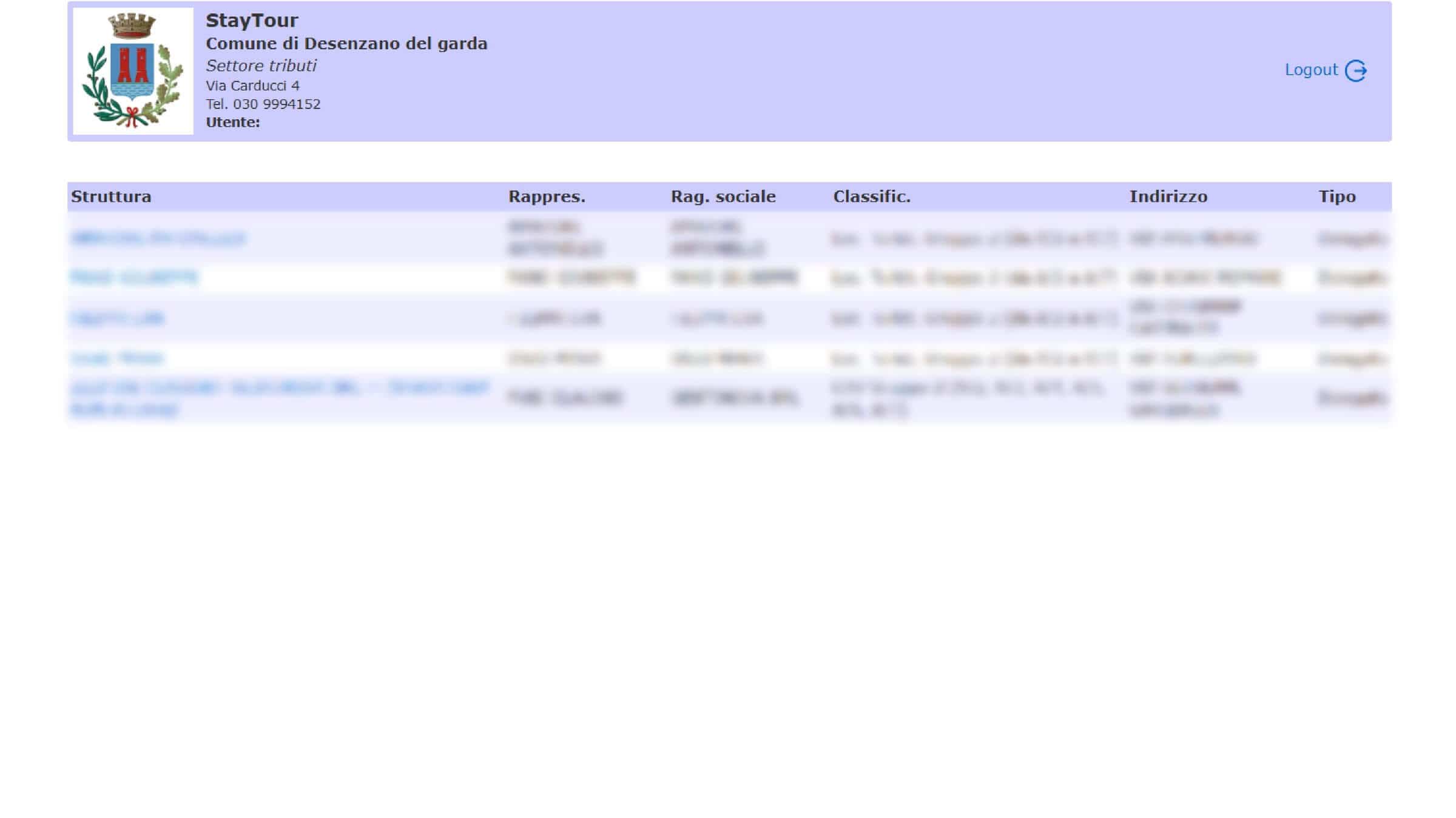
Once you have selected the accommodation, you will enter its management area. From this screen, you can view the available information and use the various portal functions to manage the tourist tax.
To return to the list of accommodations associated with your account, click the button in the bottom-left corner, as shown in the image.
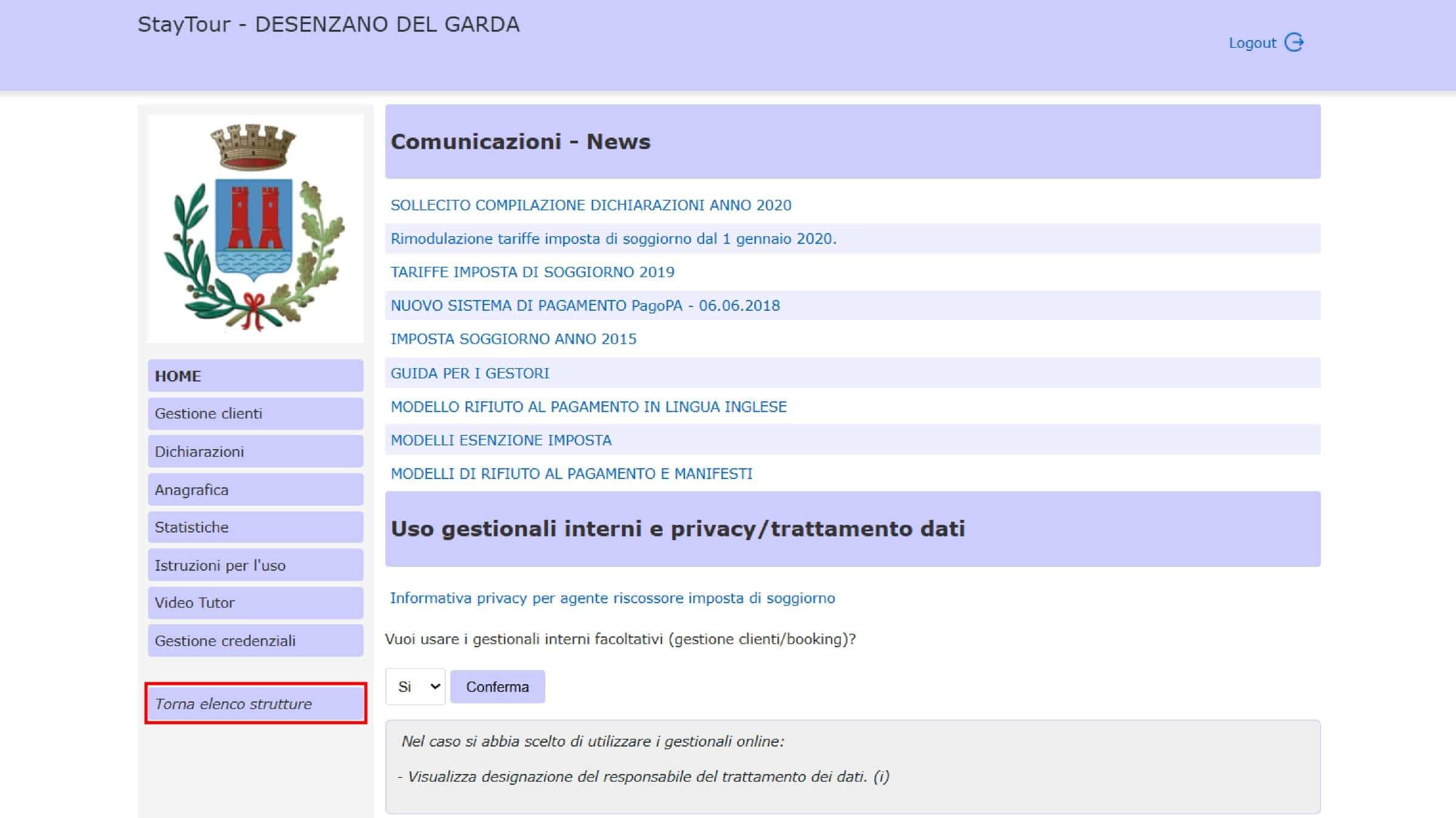
The main portal interface is divided into two areas:
- left-hand sidebar: contains the various functions for managing the accommodation and the tourist tax;
- right-hand area: mainly contains communications and news published on the platform.
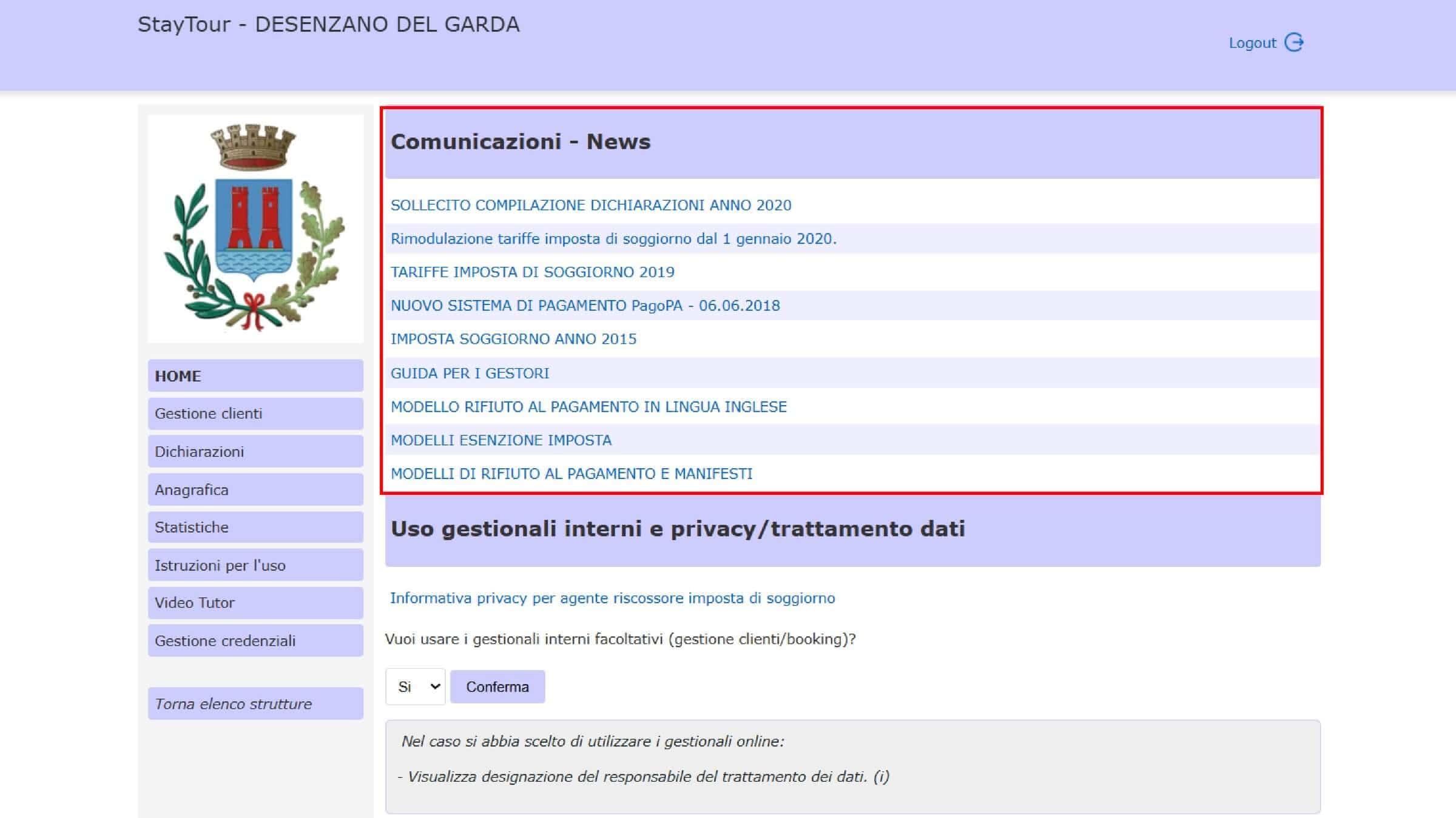
We recommend checking the “Communications - News” section regularly, so you can stay up to date with any communications from the Municipality of Desenzano del Garda and information regarding the management of the tourist tax.
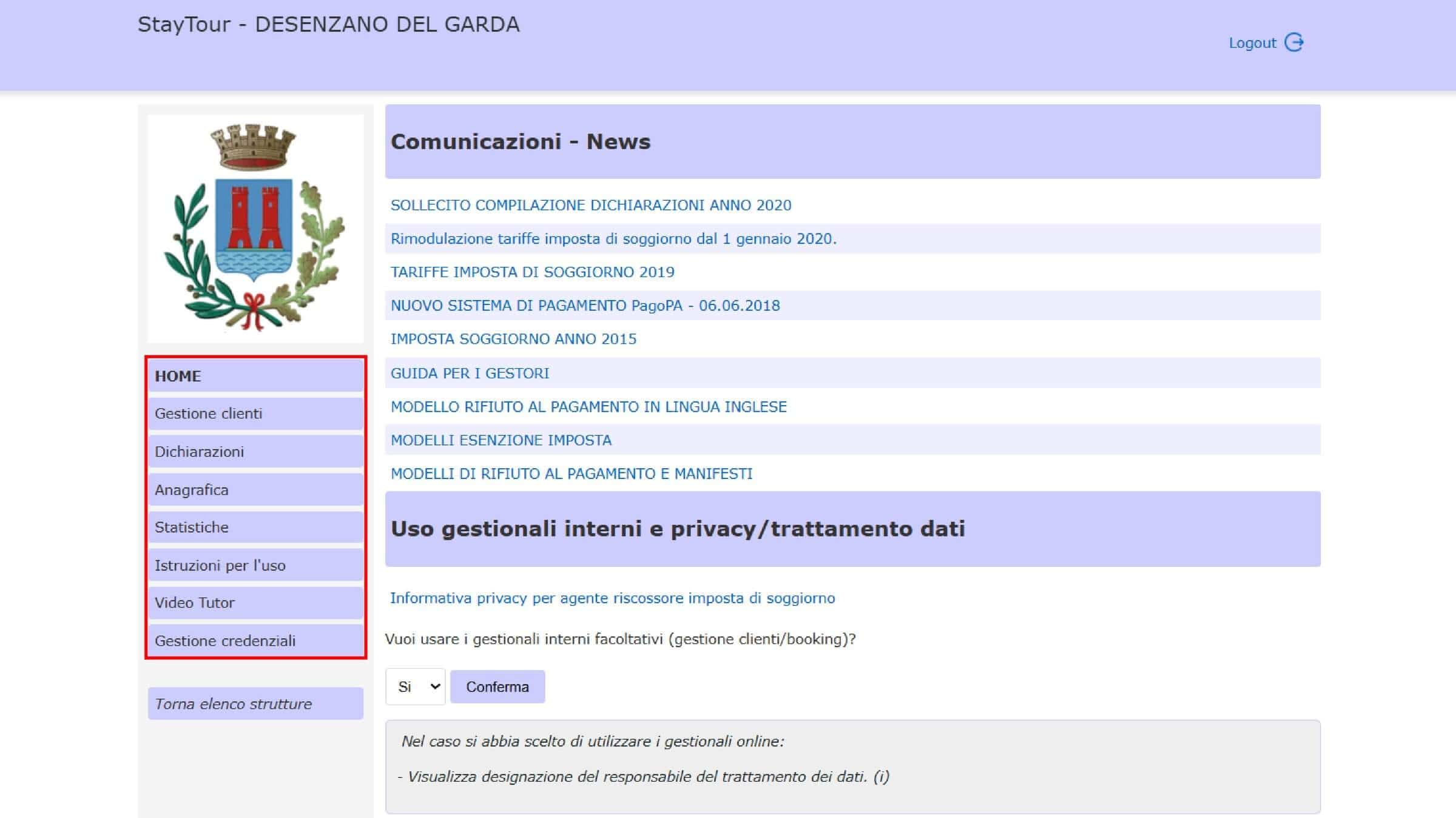
The Main Portal Functions
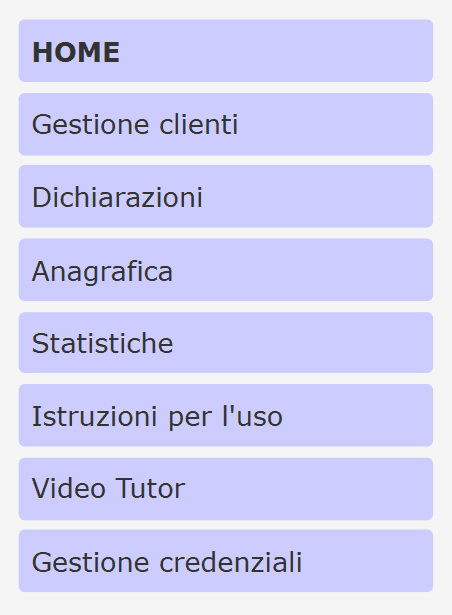
In the left-hand sidebar, you will find the main sections for managing the accommodation:
- Guest Management – allows you to register guests and manage the receipts for individual stays, distinguishing between guests subject to the tourist tax and exempt guests. In the next section, we explain in detail what receipts are and how to use them.
- Declarations – this section is used to submit the monthly tourist tax declarations to the Municipality of Desenzano del Garda.
- Accommodation Details – contains the details of the accommodation associated with the account. We recommend checking that the information is correct and, where required by the Municipality of Desenzano del Garda, also entering the CIR and CIN details.
- Statistics – allows you to view and print the accommodation’s chronological records in PDF format.
- User Instructions – contains the manual for using the platform. You can also access the manual directly here: StayTour Platform Manual
- Video Tutorial – contains videos and tutorials explaining how the platform works: StayTour Video Tutorial
- Credential Management – allows you to view and manage the credentials for the main account and any delegated SPID accounts or tax identification numbers authorized to carry out operations related to guest and tourist tax management.
Step 5
How to Create a Delegate
If you want to entrust another person with the management of the tourist tax, the main account can request to add a delegate.
The procedure can be started directly from the “Accommodation Details” section of the portal. Here, you will find the delegation request form, which must be completed and then submitted to the Municipality of Desenzano del Garda.
Delegation Form
Alternatively, you can use the delegation form template available here:
In the form, you will need to enter the details of the accommodation and manager, as well as the details of the person you want to appoint as a delegate, including:
- delegate’s first and last name;
- delegate’s tax identification number;
- accommodation details;
- manager/main account details.
Once the form has been completed and signed, send it to the Municipality of Desenzano del Garda at the following email address: [email protected]
Step 6
Receipts: How to Register Guests and Calculate the Tourist Tax
Registering guests is one of the key steps for correctly managing the Desenzano del Garda tourist tax.
The receipt (quietanza) is the document used to record the tourist tax due from guests and confirm the amount collected. In the Desenzano StayTour portal, a receipt must be created for each booking, following the procedure described below.
To get started, click “Guest Management” in the left-hand sidebar of the portal.
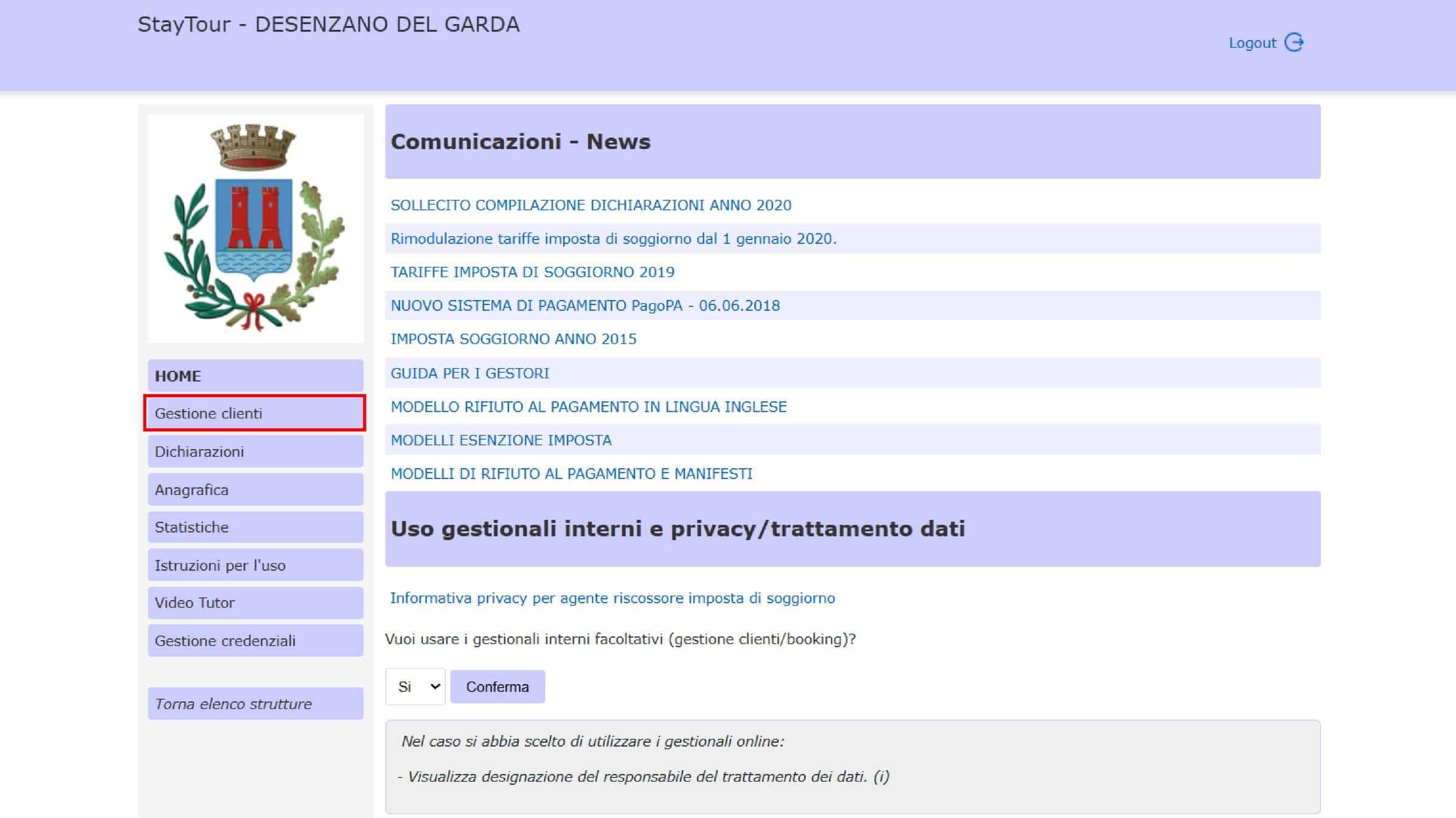
Once you enter the “Guest Management” section, you will see the list of guests already registered. If you have not yet entered any guests, the list will be empty.
Guests in the list are displayed in alphabetical order.
To register a new guest, click the “Add New Guest” button, located in the top-right corner.
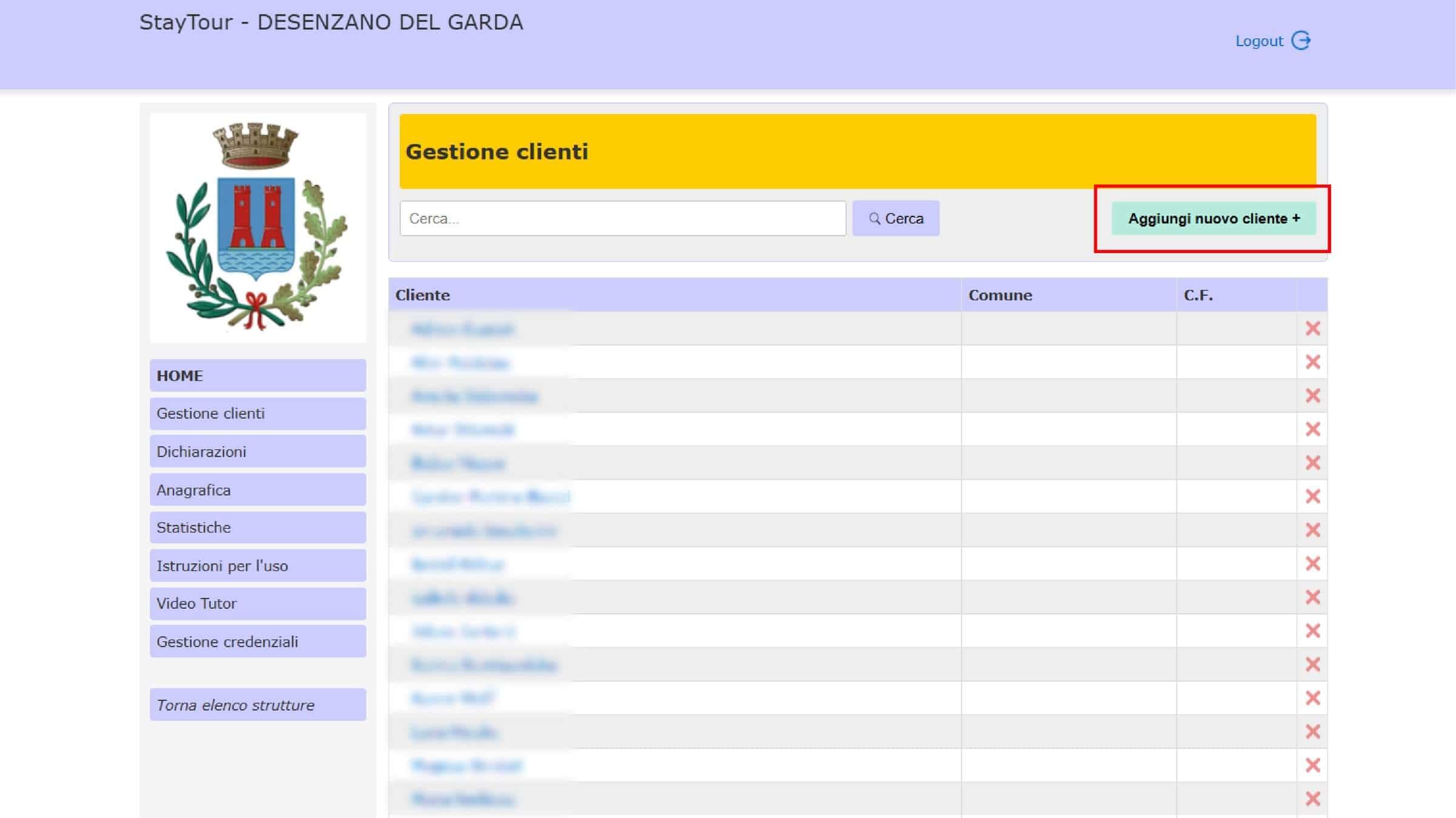
The screen for registering a new guest will open.
Enter the name of the main guest, generally the name indicated on the booking, then click “Enter Guest Details” to proceed.
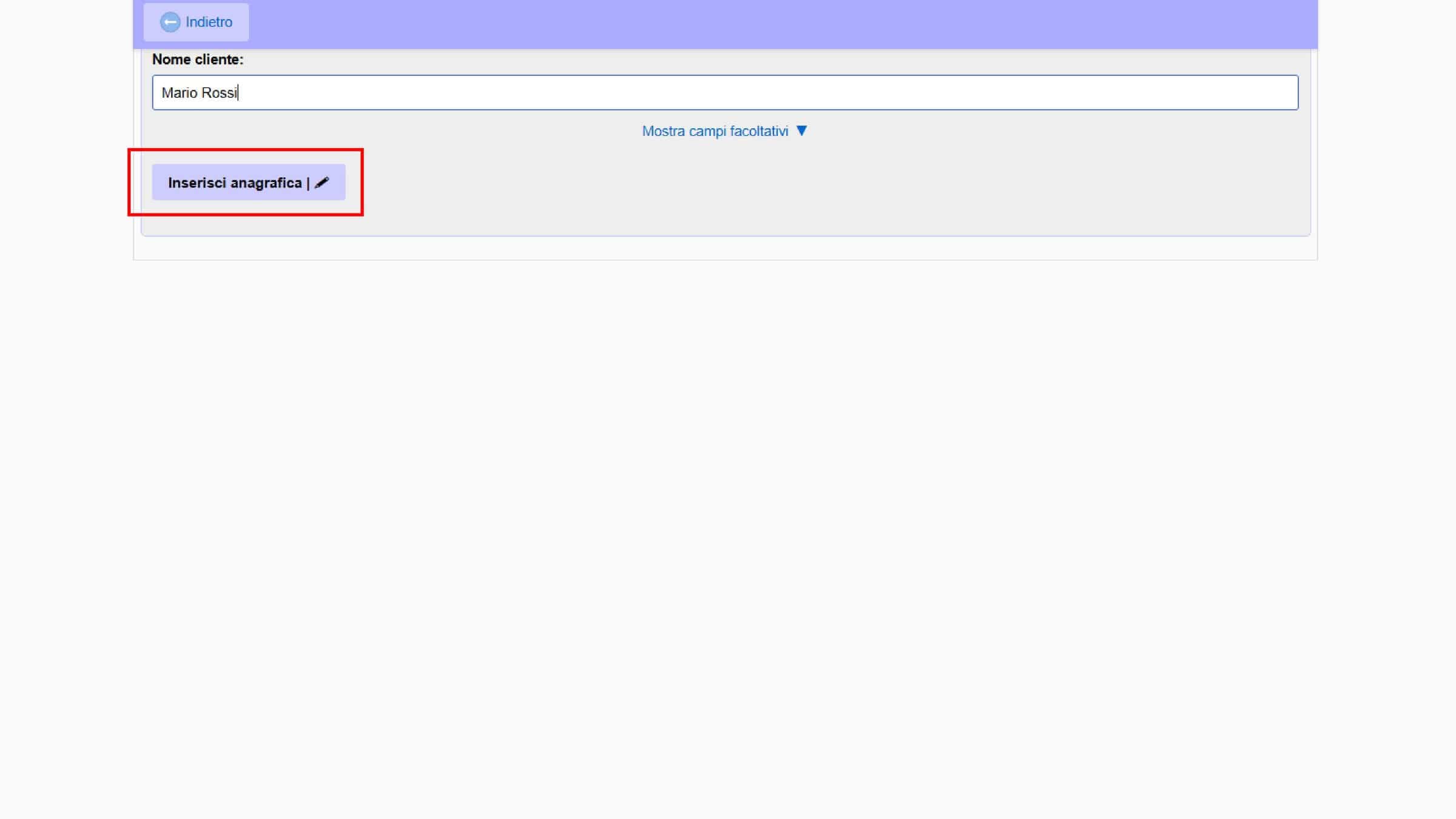
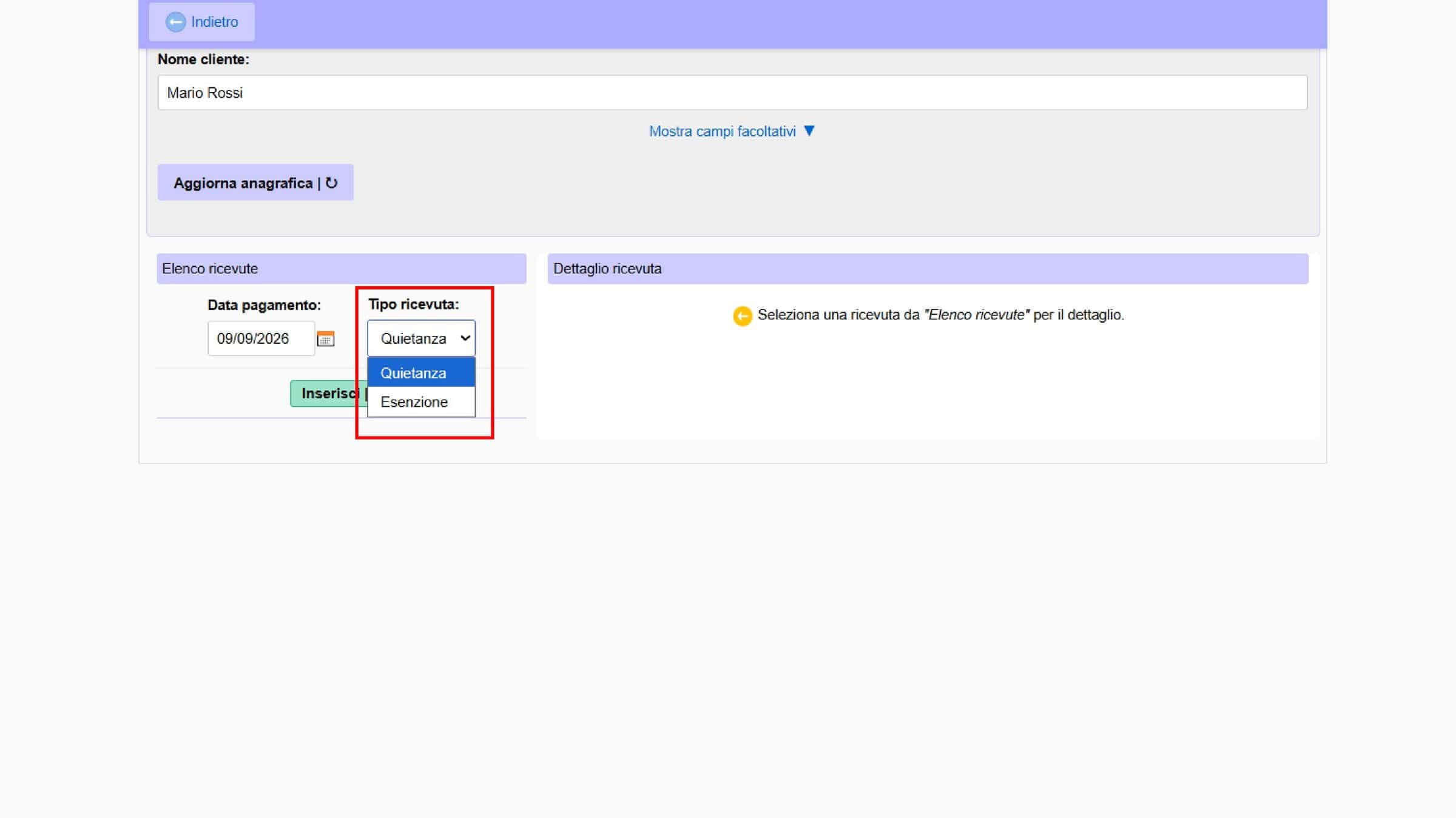
At this point, you will need to enter the receipt payment date for the Desenzano del Garda tourist tax.
For a booking, this date normally corresponds to the check-out date, when the guest’s stay ends and the tourist tax is collected.
In the portal, the payment date corresponds to the date on which the tax becomes due, which for the stay is the guest’s departure date.
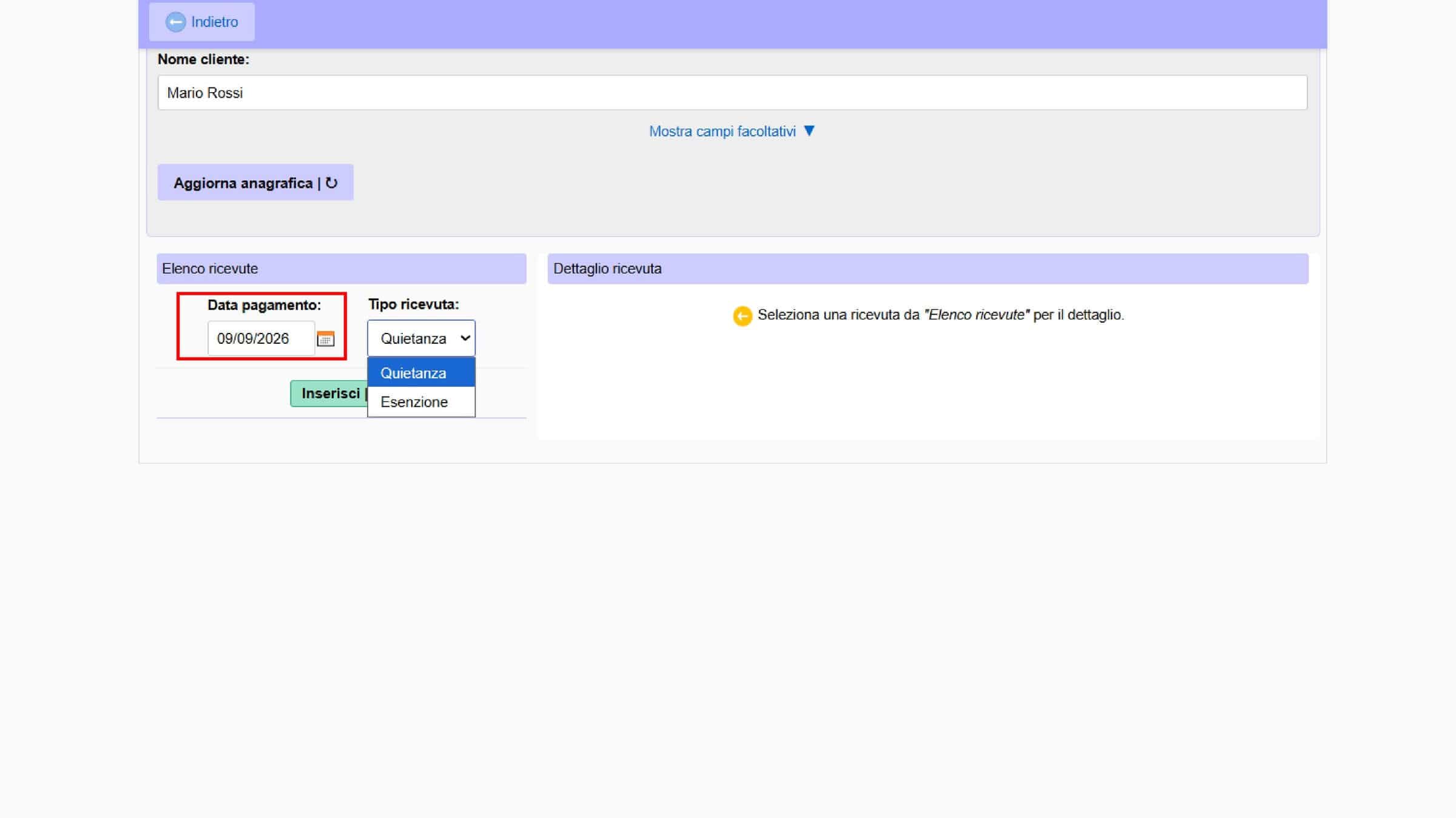
In the “Receipt Type” field, select “Receipt” to proceed with entering the details of the stay.
The “Exemption” button allows you to register an exemption directly. In most cases, you do not need to use it at this stage, because on the next screen you can separately indicate guests subject to the tourist tax and exempt guests.
After selecting “Receipt”, the screen will open where you can enter the details of the Desenzano del Garda tourist tax.
You will need to enter:
- Arrival date
- Departure date
- Taxable guests, meaning the guests for whom the tourist tax is due;
- Exempt guests, meaning guests who fall into one of the exemption categories established by the Municipality.
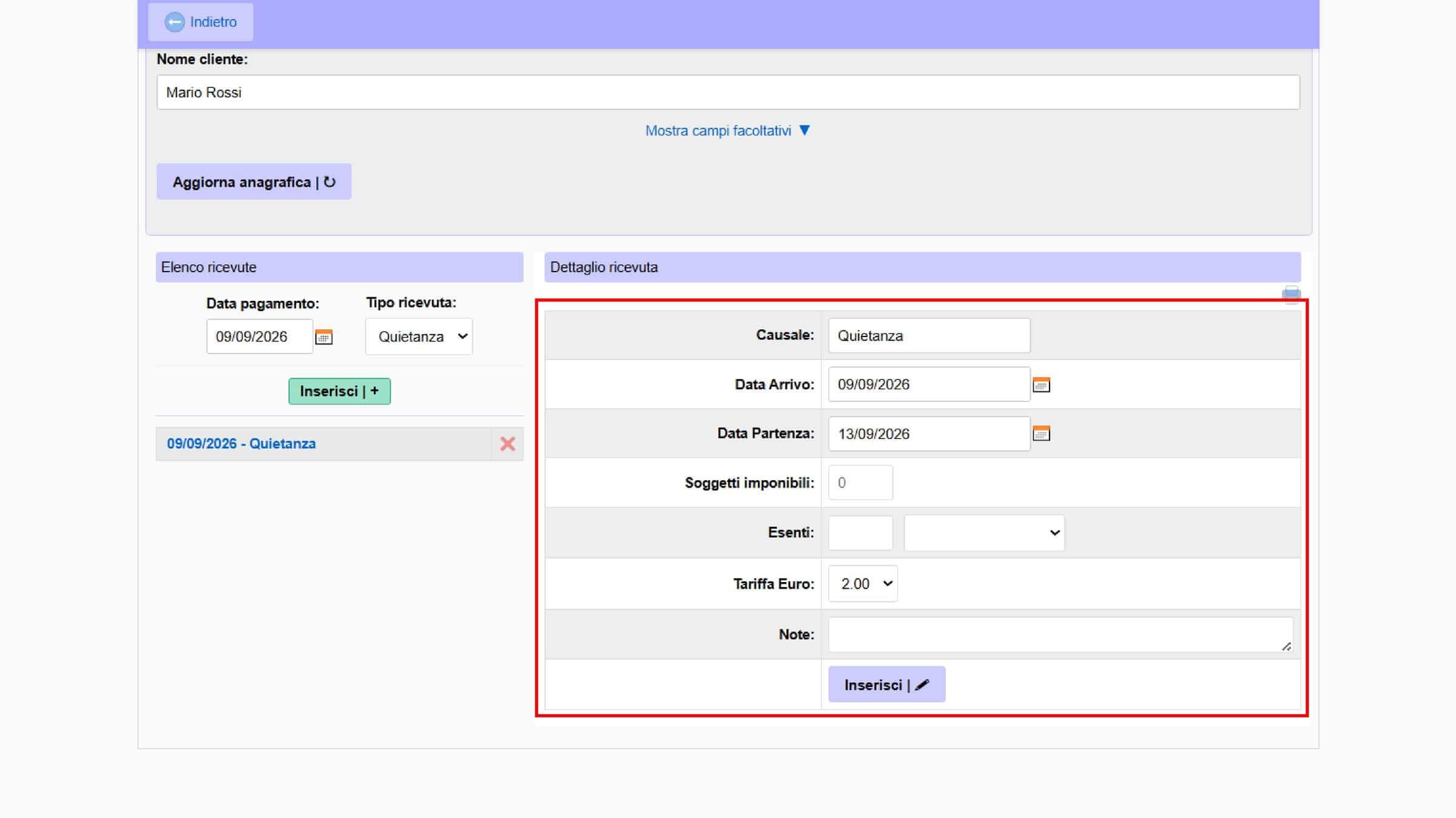
Once you have entered the guest details, click “Enter” and the system will automatically calculate the amount of tourist tax due based on the number of guests subject to the tax and the number of nights of the stay.
Which Guests Are Exempt from the Tourist Tax?
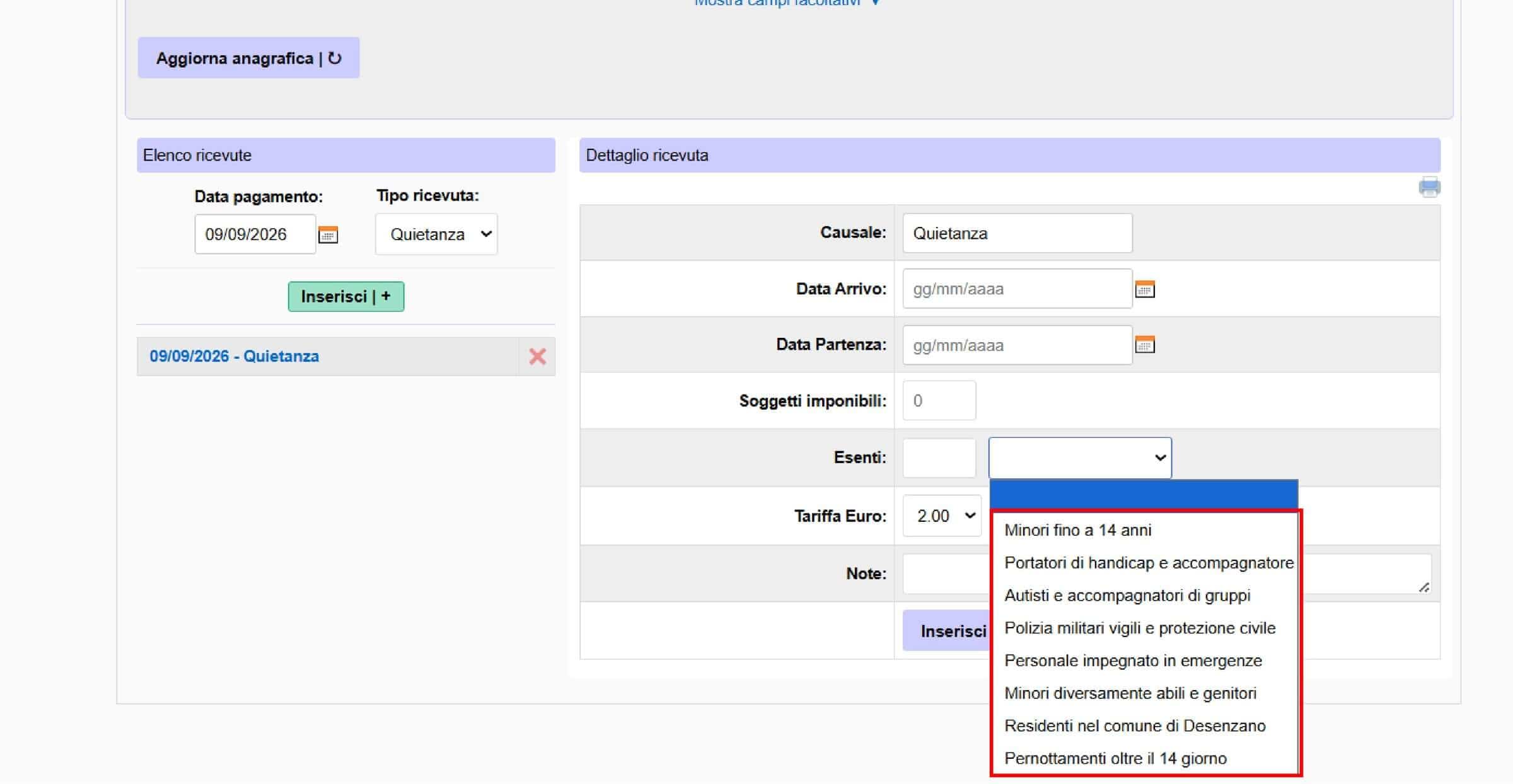
The portal includes several exemption categories. Among those provided for by the Municipality, depending on the requirements established by the regulations, are:
- children up to and including 14 years of age;
- people with disabilities, where applicable;
- drivers and group escorts, where applicable;
- police officers, military personnel, and civil protection staff, in the situations provided for;
- personnel involved in emergency activities;
- minors with disabilities and their parents, subject to the applicable conditions;
- residents of the Municipality of Desenzano del Garda;
- nights after the 14th night, exclusively for stays taking place from October 1 to March 31.
For the last category, it is important to pay particular attention: the Municipality’s regulations establish that, during the period from October 1 to March 31, nights after the 14th night are exempt from the tourist tax. This exemption should therefore not be automatically applied to stays of more than 14 nights taking place during the rest of the year.
Consult the Tourist Tax Regulations of the Municipality of Desenzano del Garda
To apply an exemption, simply select the category corresponding to the guest’s situation in the portal.
Step 7
Monthly Declaration: How to Submit It and When Is It Due?
The monthly Desenzano del Garda tourist tax declaration must also be submitted for months with no guest stays.
The amount of tourist tax depends on the type of accommodation facility. For 2026, in the case of Holiday Homes and Apartments (CAV) and tourist rentals to which the €2.00 rate applies, the tourist tax is €2.00 per person per night. Exemptions apply, including the exemption for guests up to and including 14 years of age, as well as the other categories provided for by the municipal regulations.
To find out which rates apply to other types of accommodation, consult the official Municipality of Desenzano del Garda page dedicated to the Tourist Tax.
Tourist Tax – Municipality of Desenzano del Garda
When to Submit the Declaration and Pay the Tourist Tax?
The monthly declaration and payment of the Desenzano del Garda tourist tax must be completed for each month of the year, from January 1 to December 31.
The deadline is the 15th of the month following the reference month.
For example:
- January stays → by February 15;
- February stays → by March 15;
- March stays → by April 15.
How to Create a Monthly Declaration
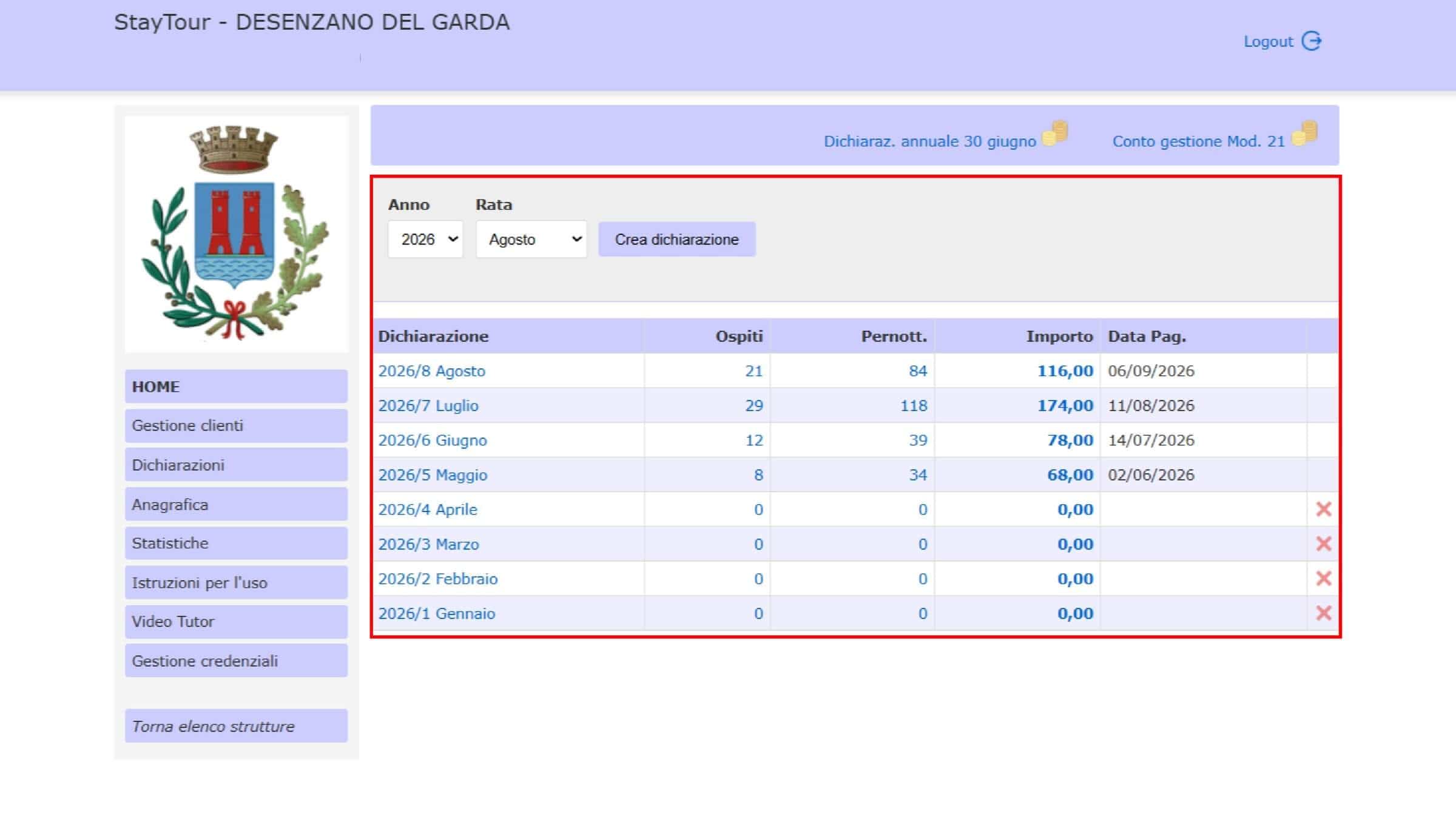
To create a new declaration, from the portal Home page click “Declarations” in the sidebar.
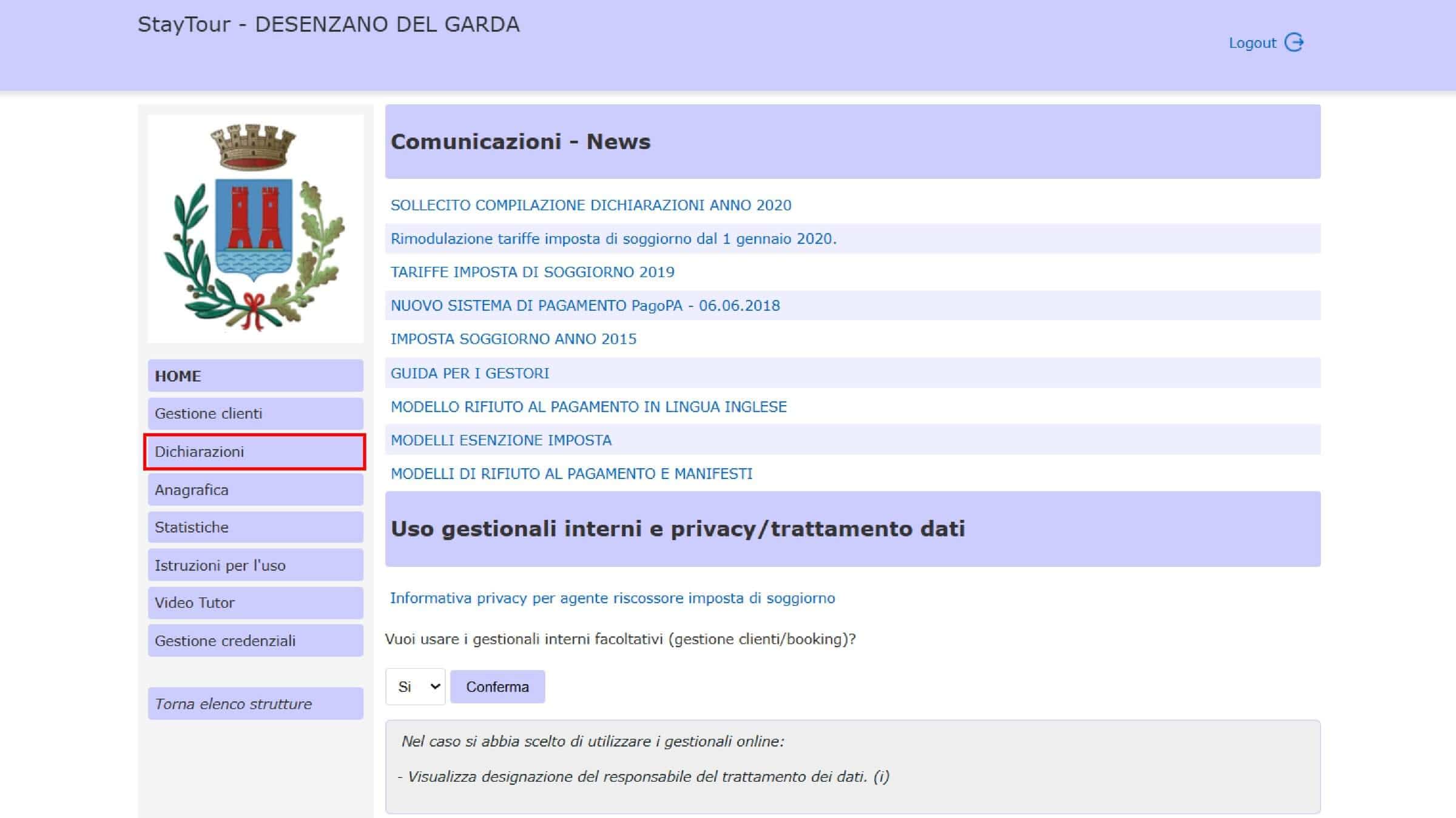
Once you enter the “Declarations” section, you will see the screen where you can create the monthly declarations.
Select the reference year and the month for which you want to submit the declaration.
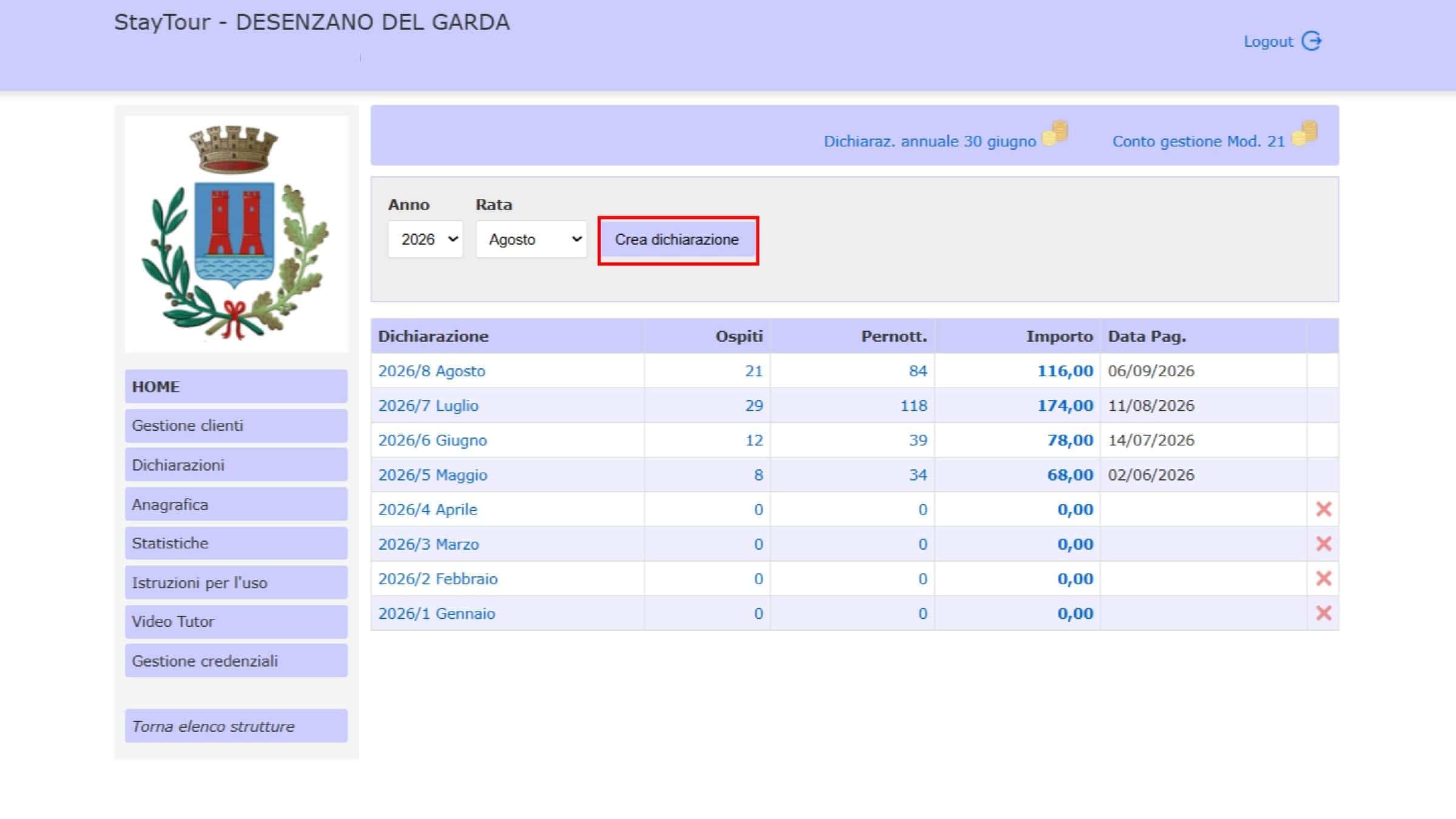
After selecting the year and month, click “Create Declaration”.
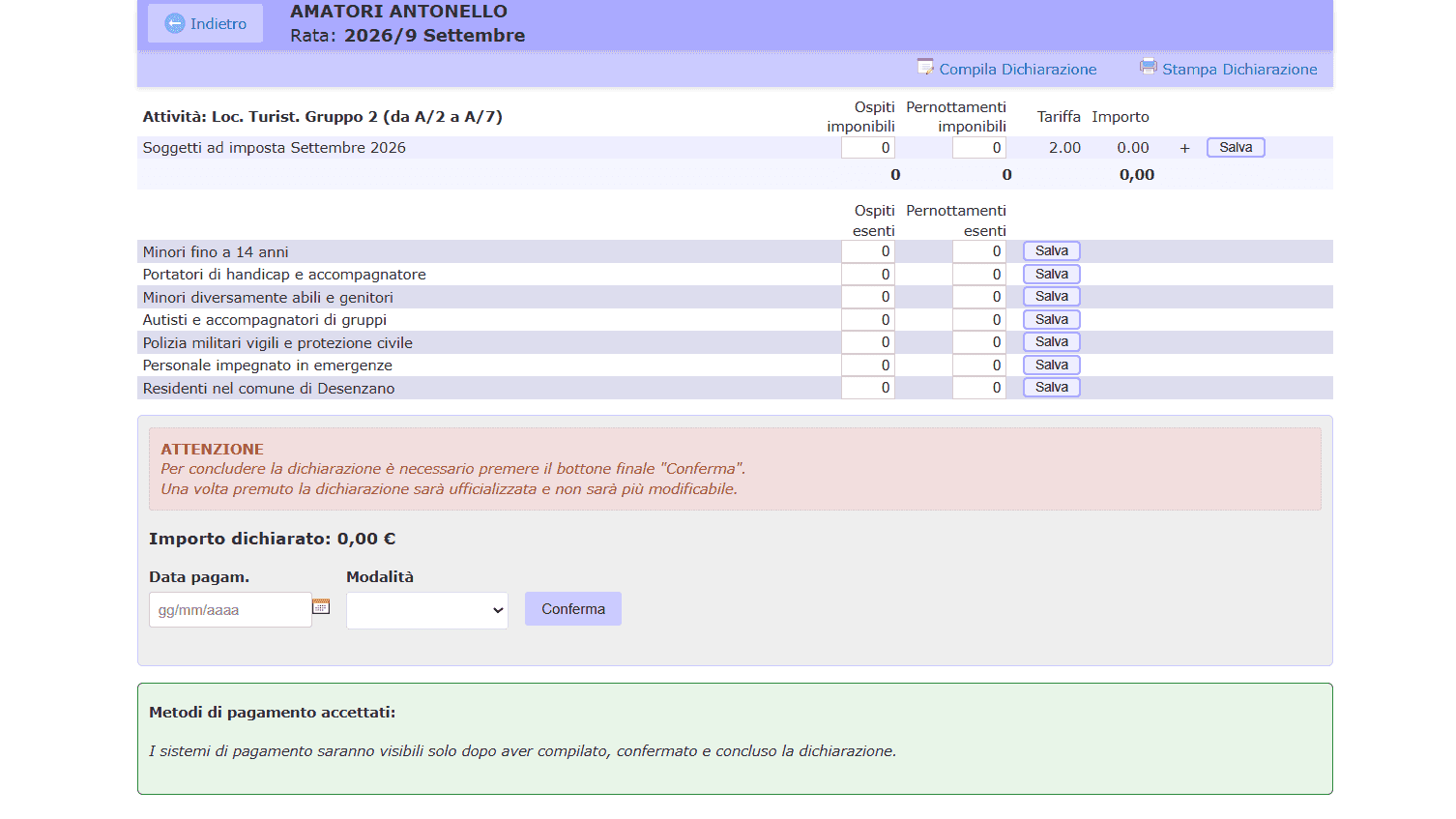
At this point, you will be taken to the screen for the declaration for the selected month.
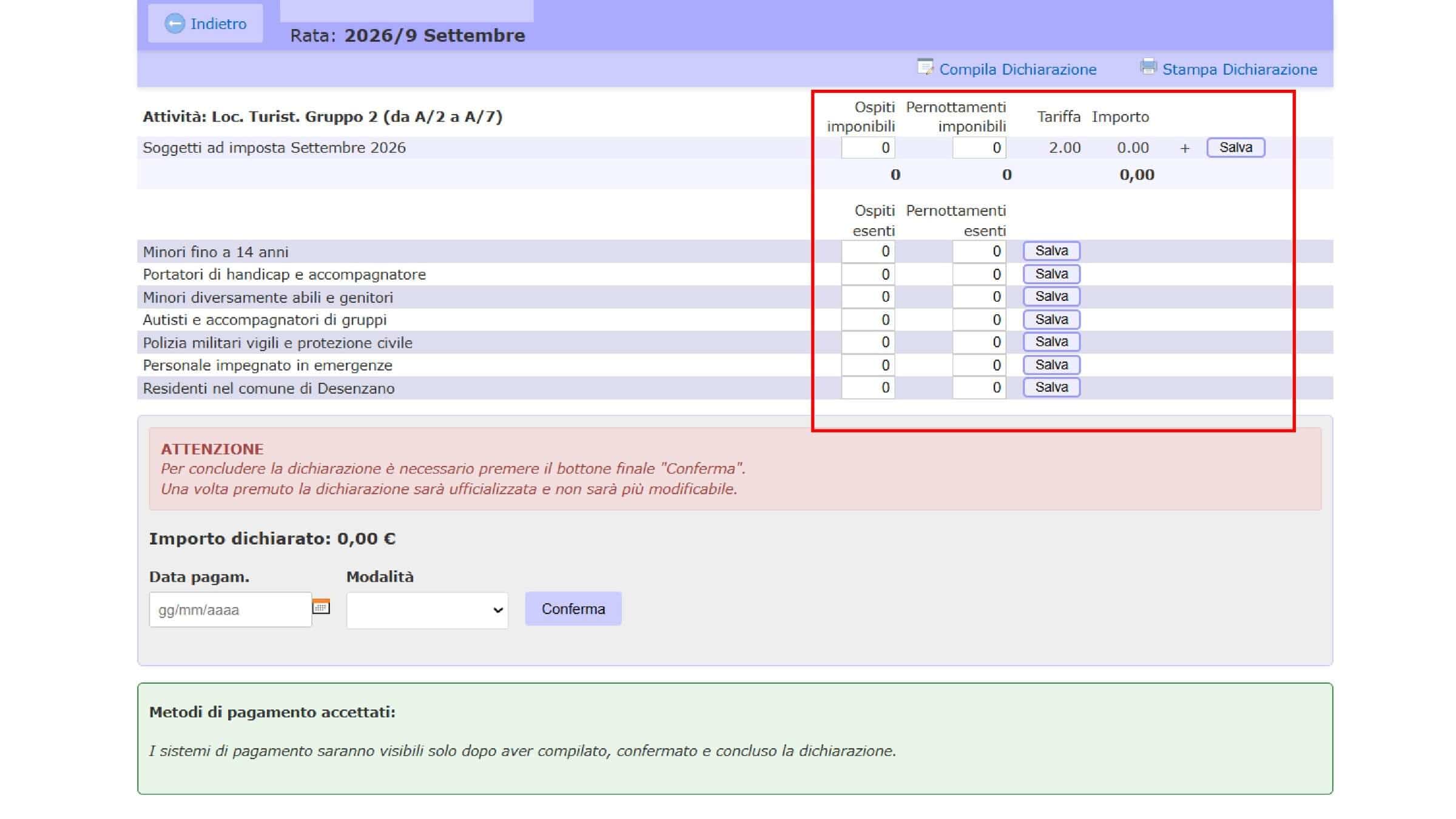
Entering the Data Manually
On this screen, you can manually enter the data for the month’s guests, indicating separately:
- guests subject to the tourist tax;
- exempt guests.
Enter the data in the relevant fields shown on the screen.
Automatically Completing the Declaration
If you have correctly completed the receipts following the previous step, you can avoid entering the data manually again and use the automatic completion function.
To do this, click “Complete Declaration” in the top bar.
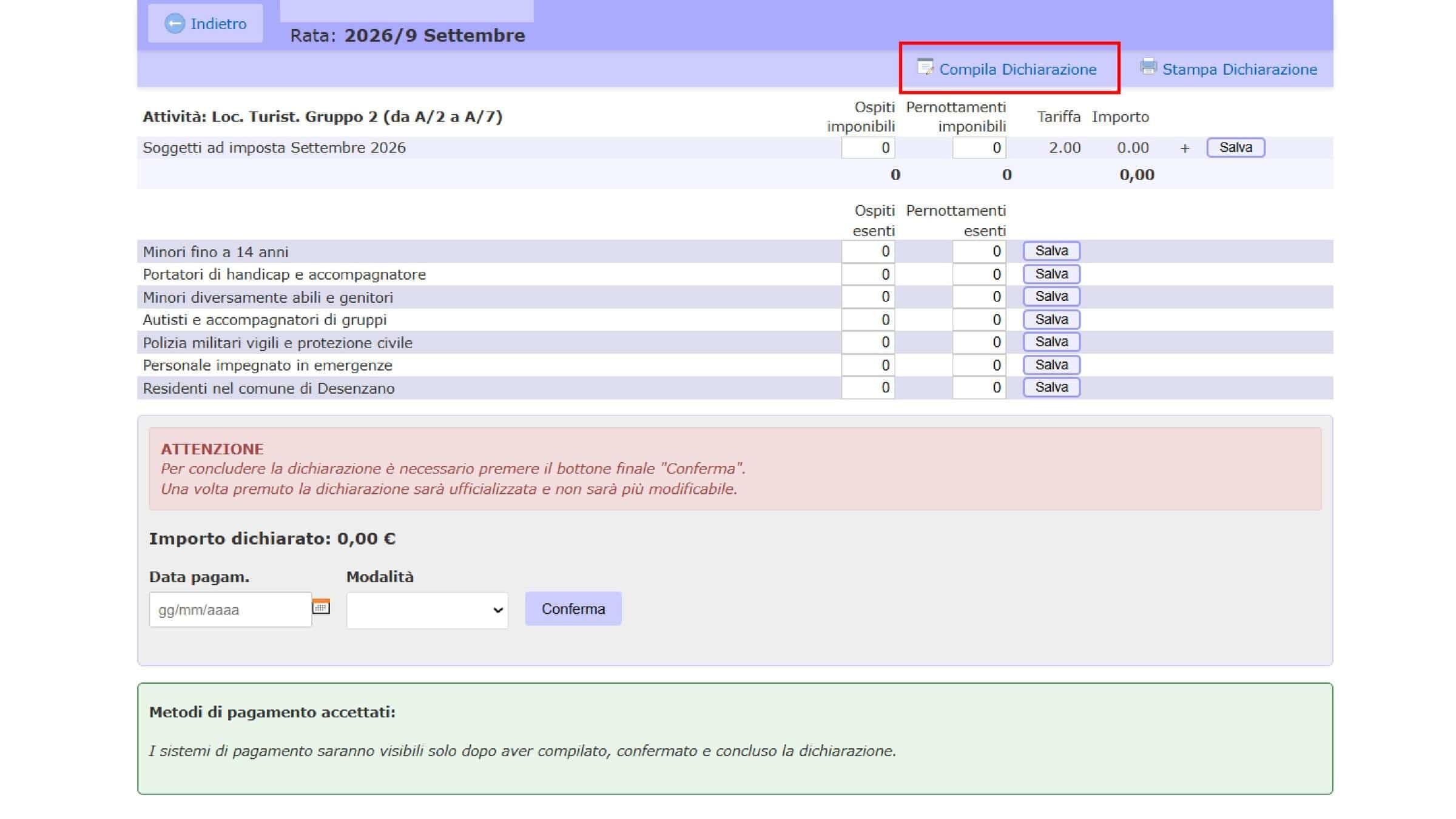
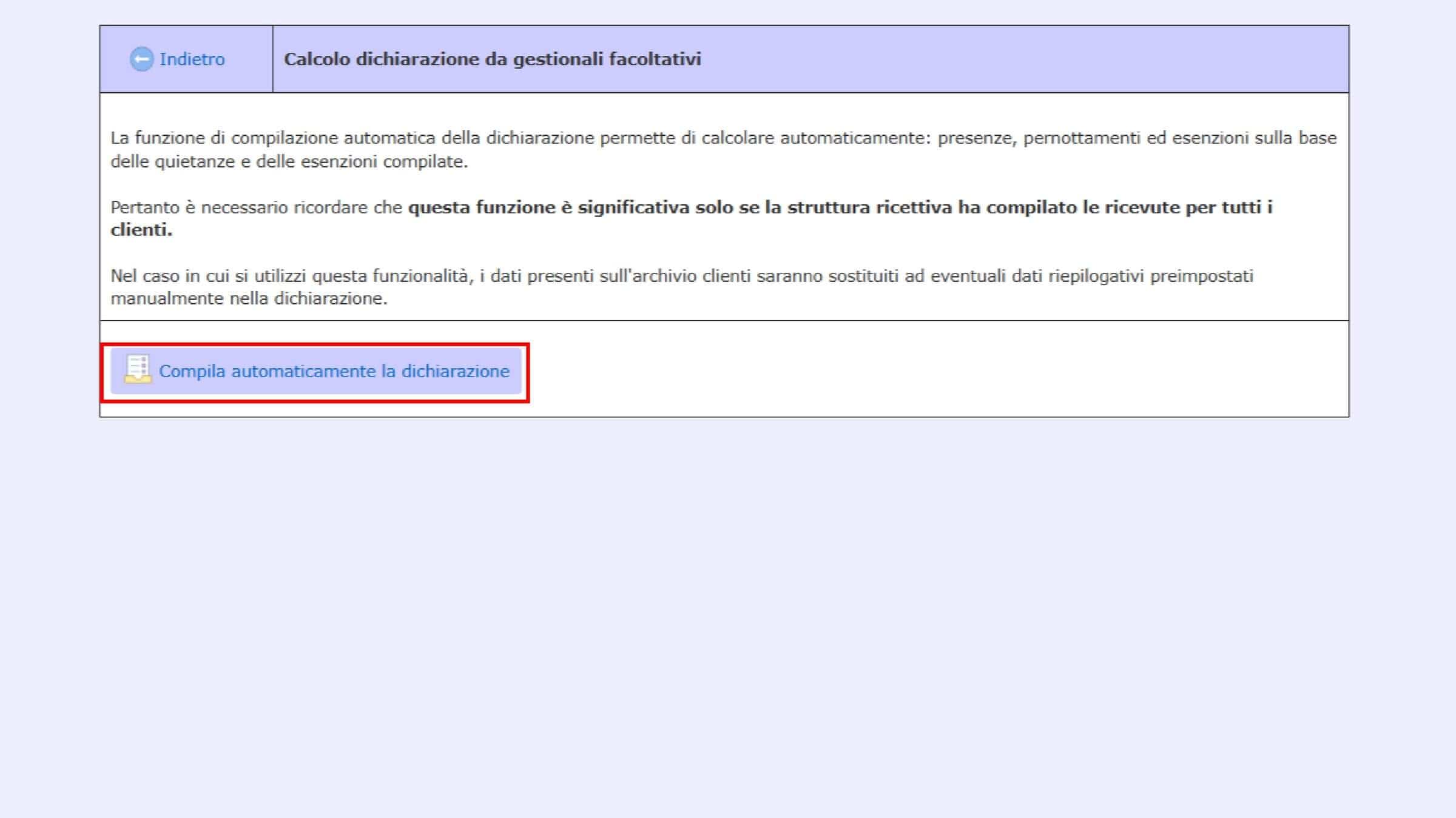
A screen will open explaining how the system uses the previously registered receipts to complete the declaration.
To proceed, click “Automatically Complete the Declaration”.
The system will then use the data already entered in the receipts to automatically complete the monthly Desenzano del Garda tourist tax declaration.
Step 8
How to Pay the Tourist Tax
Once you have completed the declaration, you can proceed with the payment of the Desenzano del Garda tourist tax via PagoPA. The system will automatically calculate the amount of tourist tax to be paid based on the data entered.
To proceed with the payment, scroll down to the bottom of the screen and enter:
- payment date;
- payment method, selecting PagoPA, the only payment method available in the portal.
After entering the required information, click “Confirm”.
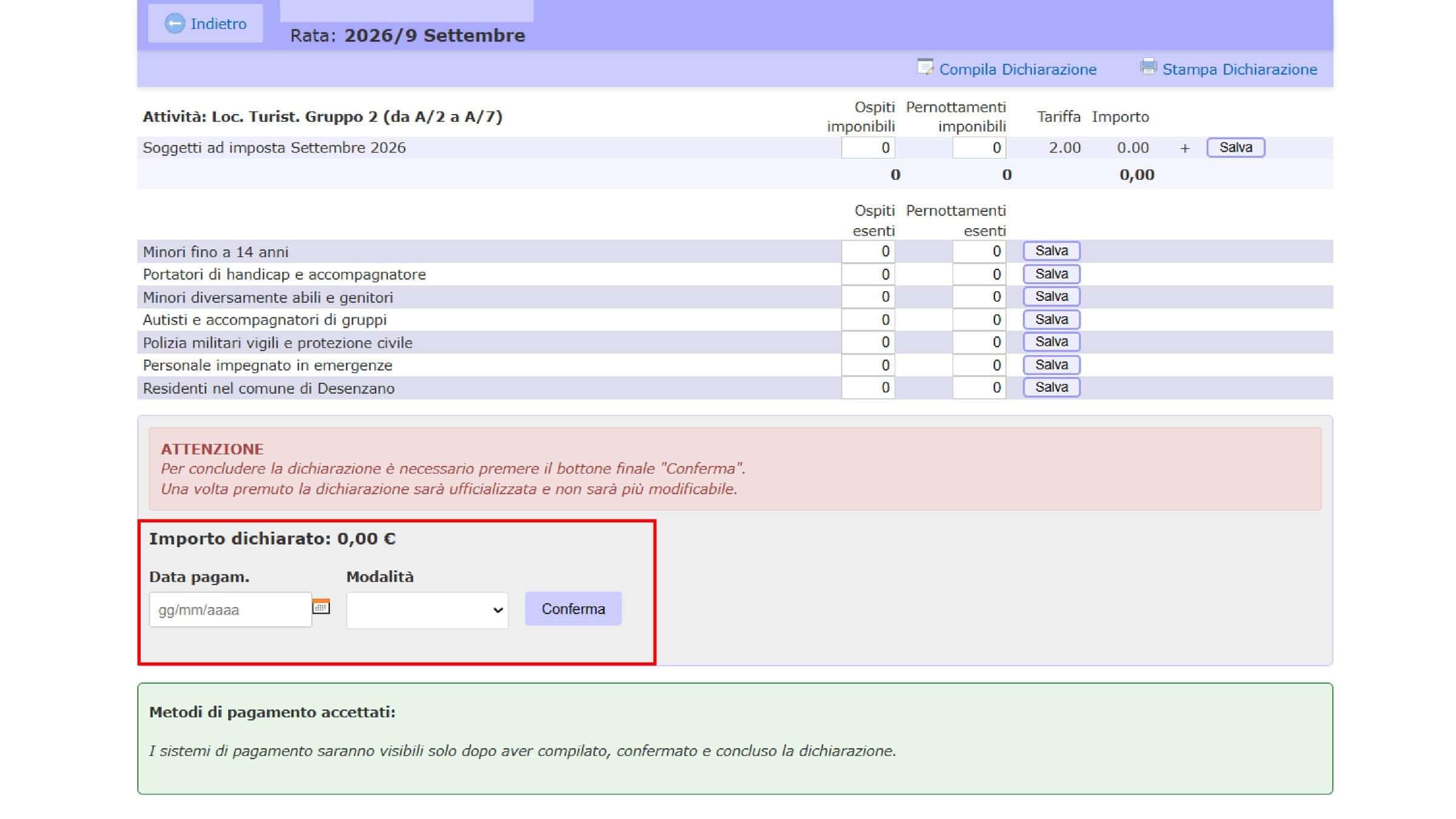
At this point, you can generate the PagoPA payment notice for the tourist tax amount.
The payment notice contains the information required to make the payment. You can use the PagoPA payment notice or proceed using the payment methods made available through the PagoPA system.
Step 9
What If I Had No Guests? How to Manage Zero-Activity Months
A holiday home may be managed on a seasonal or hybrid basis: for example, it may be used for short-term rentals during the high season and for other types of rentals during the low season. It may also simply remain closed for several months.
Even in months when you have had no guests subject to the tourist tax, you must still submit the monthly declaration indicating zero.
This allows the Municipality to verify that the month has been correctly declared and is not considered a missing or unsubmitted declaration.
How to Declare a Month with 0 Guests
To declare a month with no guest stays, go to the “Declarations” section of the portal and create the declaration for the relevant month, following the procedure described in the previous section.
Once the declaration is open, do not enter any guests and leave all values at 0.
This way, the declaration for the month will be correctly submitted even when there have been no overnight stays.
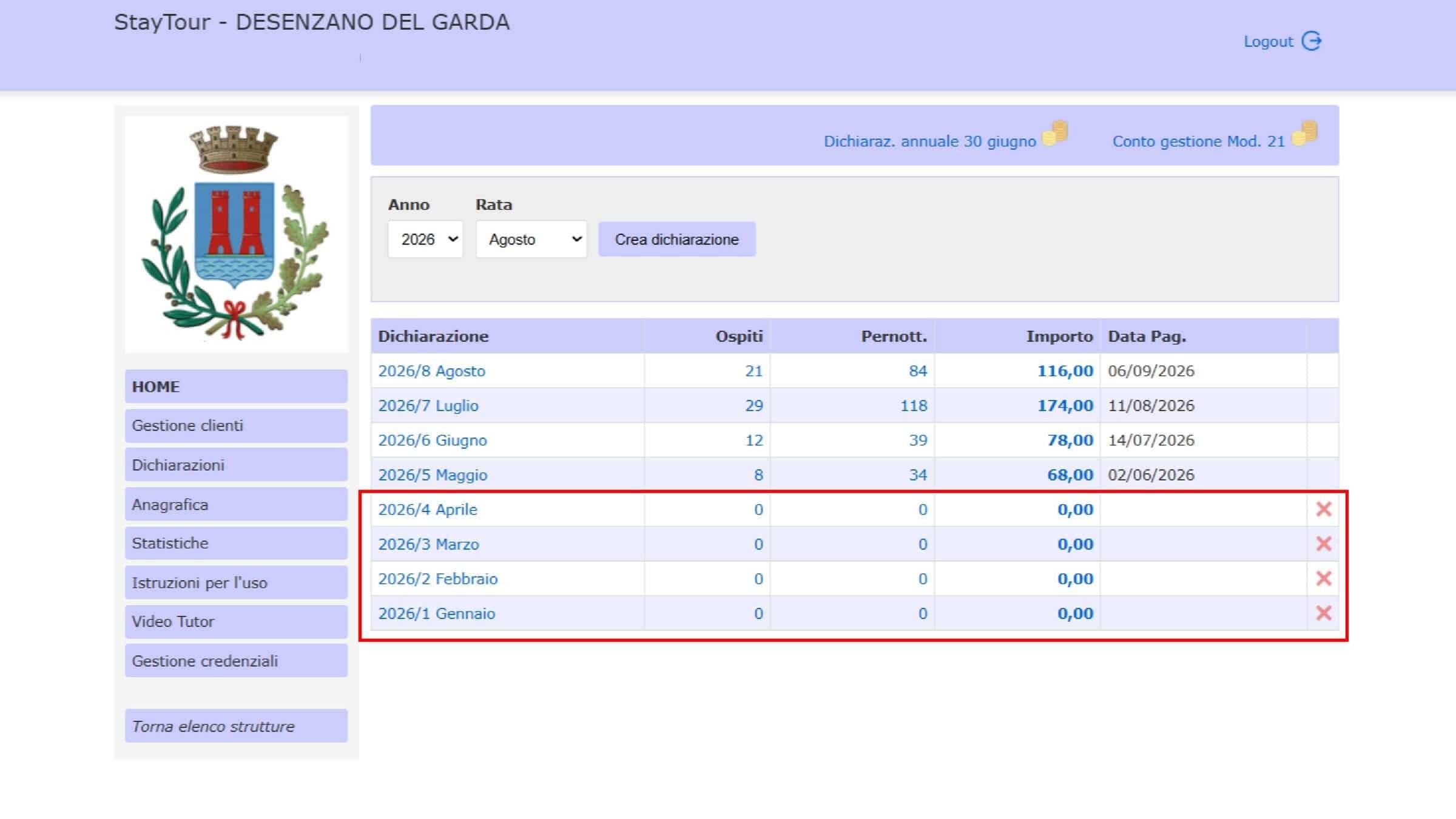
In the screen above, you can see some examples of months declared with 0 guests.
This allows you to make sure that no months are missing and reduce the risk of receiving communications from the Municipality regarding missing or late declarations.
Step 10
Annual Tourist Tax Declaration
Thought you were finished? Not quite. In addition to the monthly declarations and related tourist tax payments, there is also an annual requirement.
Since 2020, the manager of the accommodation facility and the person who collects the rent or consideration for a short-term rental must submit an annual cumulative tourist tax declaration, exclusively online, by June 30 of the following year.
For example, for tourist tax relating to 2025, the annual declaration must be submitted by June 30, 2026.
Are Managers Still Considered Accounting Agents?
This point requires some clarification, because the Municipality of Desenzano’s website still contains documentation relating to “Accounting Agents”, published in 2020.
However, this refers to the previous regime. The legislation changed with Article 180 of Decree-Law 34/2020, and the Municipality of Desenzano specifies that, since May 19, 2020, managers are no longer considered accounting agents for tourist tax purposes. Instead, they are classified as tax collection agents with the right to recover the tax from the guest.
Therefore, when managing the tourist tax under the current system, the former rules concerning accounting agents should not be confused with the annual requirement currently in force.
What to Keep
Even though the annual declaration is submitted online, it is important to keep all documentation relating to the tourist tax.
In particular, we recommend keeping:
- monthly declarations;
- receipts and payment documents issued to guests;
- documentation relating to any exemptions;
- payment receipts for payments made through PagoPA;
- any other documentation used to determine the amounts declared.
The Municipality of Desenzano specifies that documentation relating to the tourist tax must be kept for 5 years.
Attention to Other Tax Requirements
The annual tourist tax declaration should not be confused with other tax obligations that may apply to those managing short-term rentals or accommodation facilities.
For example, the Italian Revenue Agency also provides for specific requirements relating to short-term rental contract data, which are governed by separate rules.
Gardastays is also preparing a dedicated guide covering these additional requirements.
Step 11
Model 21: Is It Still Mandatory?
Until 2025, Model 21 – Management Account was an additional requirement for accommodation facility managers.
The form provided an annual summary of the amounts collected as tourist tax and the corresponding payments made to the Municipality. It had to be completed and signed by the manager and submitted to the Municipality by the deadline established by the municipal regulations.
This requirement was linked to the former classification of the manager as an accounting agent, with the resulting obligation to submit the management account to the Court of Auditors. The Municipality of Desenzano had in fact established a specific procedure for completing Model 21.
From 2026, Model 21 No Longer Has to Be Submitted
The situation changed in 2026 following Italian Supreme Court Joint Sections Order No. 1527 of January 23, 2026, which clarified that the Court of Auditors does not have jurisdiction over tourist tax matters.
As a result, with the previous classification of the manager as an accounting agent no longer applying, Model 21 no longer has to be submitted for tourist tax purposes. This new approach is consistent with the system already introduced by the Municipality of Desenzano following the 2020 reform, when managers were classified as tax collection agents rather than accounting agents.
Step 12
Final Checklist: What Do You Need to Do Each Month and Each Year?
If you manage a holiday home, tourist rental, or another accommodation facility in Desenzano del Garda, you can use this checklist to make sure you have completed all the requirements relating to the tourist tax.
Before You Start
- I have correctly registered the accommodation through SUAP.
- I have obtained the CIR and any other identification codes that may be required.
- I have requested access to the Desenzano del Garda tourist tax portal.
- I have logged in using SPID, CIE, or credentials provided by the Municipality.
- I have checked that the accommodation is correctly associated with my account.
For Each Stay
- I have registered the guests in the StayTour portal.
- I have entered the arrival and departure dates correctly.
- I have checked which guests are subject to the tourist tax and which are exempt.
- I have registered the relevant receipt.
- I have checked that the tourist tax amount calculated by the portal is correct.
Every Month
- I have checked all guest stays for the month.
- I have submitted the monthly declaration by the applicable deadline.
- Even if there were no guests, I have submitted the declaration with zero values.
- I have paid the tourist tax via PagoPA by the deadline.
- I have kept the payment receipt and documentation relating to the declarations.
Once a Year
- I have submitted the annual tourist tax declaration by June 30 of the following year.
- I have kept receipts, monthly declarations, exemption documentation, and payment receipts.
- I have not submitted Model 21, as it is no longer required from 2026 under the current system.
Remember
Managing the tourist tax does not end with simply paying the tax. It is important that guest stays, receipts, monthly declarations, payments, and the annual declaration are all consistent with one another.
You should also keep all documentation relating to the tourist tax for the period required by the Municipality, which is 5 years.
For owners
Are You Still Having Trouble with the Tourist Tax Portal?
If you manage a holiday home in Desenzano del Garda and are unsure how to correctly manage the tourist tax, Gardastays can help you with the administrative management of your holiday home.
.
FAQ
Frequently asked questions
How much is the tourist tax in Desenzano del Garda?
In 2026, for holiday homes and apartments (CAV) and tourist rentals subject to the €2.00 rate, the tax is €2.00 per person per night. Other types of accommodation have different rates. Exemptions include children up to and including the age of 14; nights after the 14th are exempt only for stays between 1 October and 31 March.
When is the monthly declaration due?
The declaration and payment are due for every month of the year by the 15th of the following month: for example, January stays by 15 February. You must submit the declaration even in months with no guests, declaring zero stays.
How do you pay the Desenzano tourist tax?
Only via PagoPA. After completing the monthly declaration on the StayTour portal, you enter the payment date and method, confirm, and generate the PagoPA payment notice with the amount calculated by the system.
Can you access the portal without SPID or CIE?
Yes: foreign owners and anyone without Italian SPID or CIE must request login credentials from the Tourist Tax Office of the Municipality of Desenzano del Garda ([email protected], +39 030 9994152) and then log in with the “Credentials” option.
Is Model 21 still mandatory?
No. Following order no. 1527 of 23 January 2026 of the Joint Sections of the Italian Court of Cassation, Model 21 no longer has to be submitted for the tourist tax. The annual declaration, due by 30 June of the following year, still applies.
What changes for the Desenzano tourist tax in 2027?
The Municipality can update the rates every year: for 2027, check the official tourist tax page and the regulation in force. The monthly declaration by the 15th of the following month and payment via PagoPA still apply, and the annual declaration for 2026 is due by 30 June 2027.